What’s New in May 2025: Standalone Calculators, New Tools, and Ester® Enhancements

We’re turning up the dial this May with new tools that simplify analysis, streamline workflows, and enhance clarity in client communication. Whether you’re running projections on complex trust structures or signing estate documents with ease, this release equips you with more precision and flexibility across the board.

From the newly unlocked Heritage Map to enhanced Ester document transparency, dive into what’s new this month—and what it means for your day-to-day.

Analyze Trust Strategies in a Click

Standalone Calculators for Irrevocable Trusts & State Estate Tax Analysis:
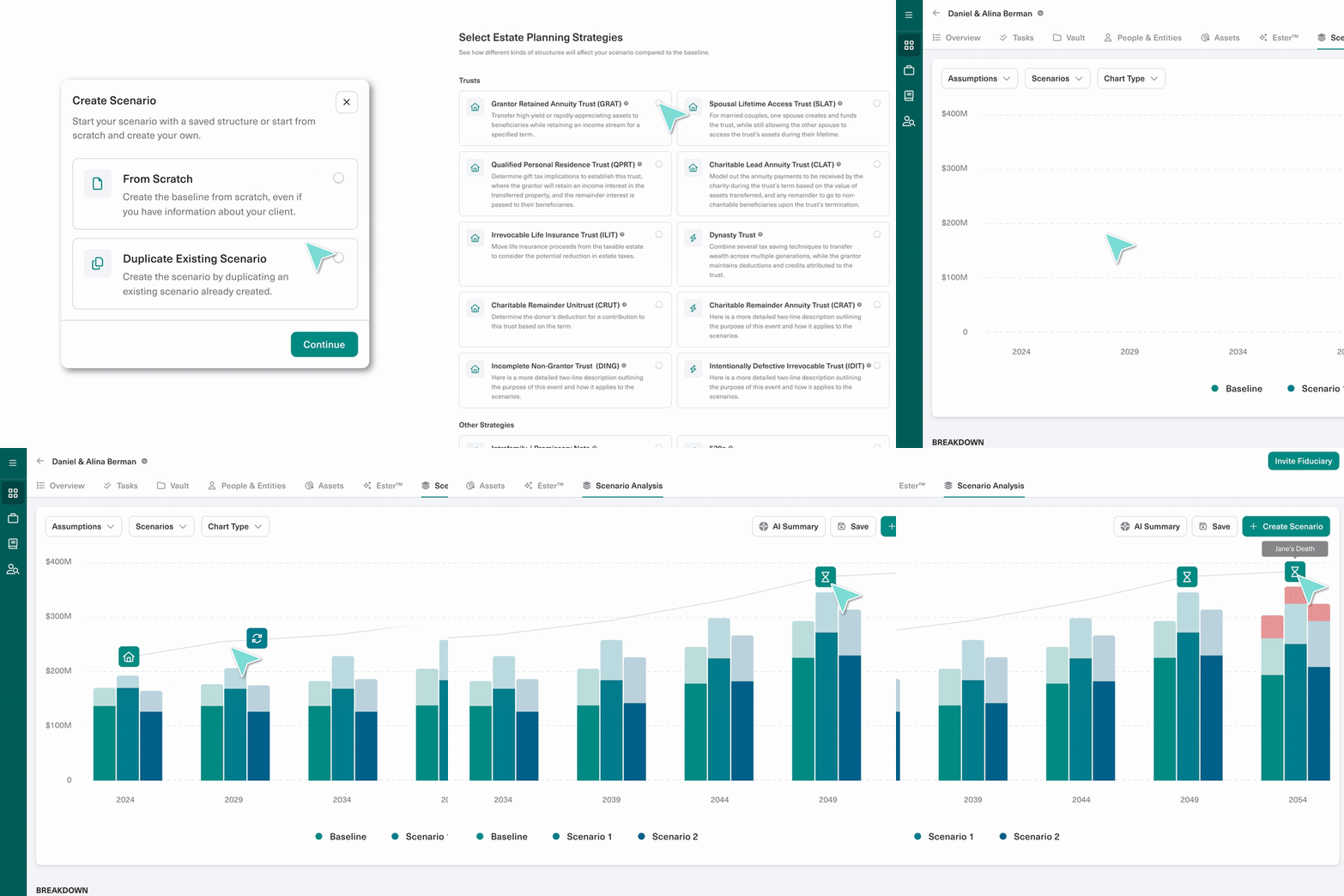
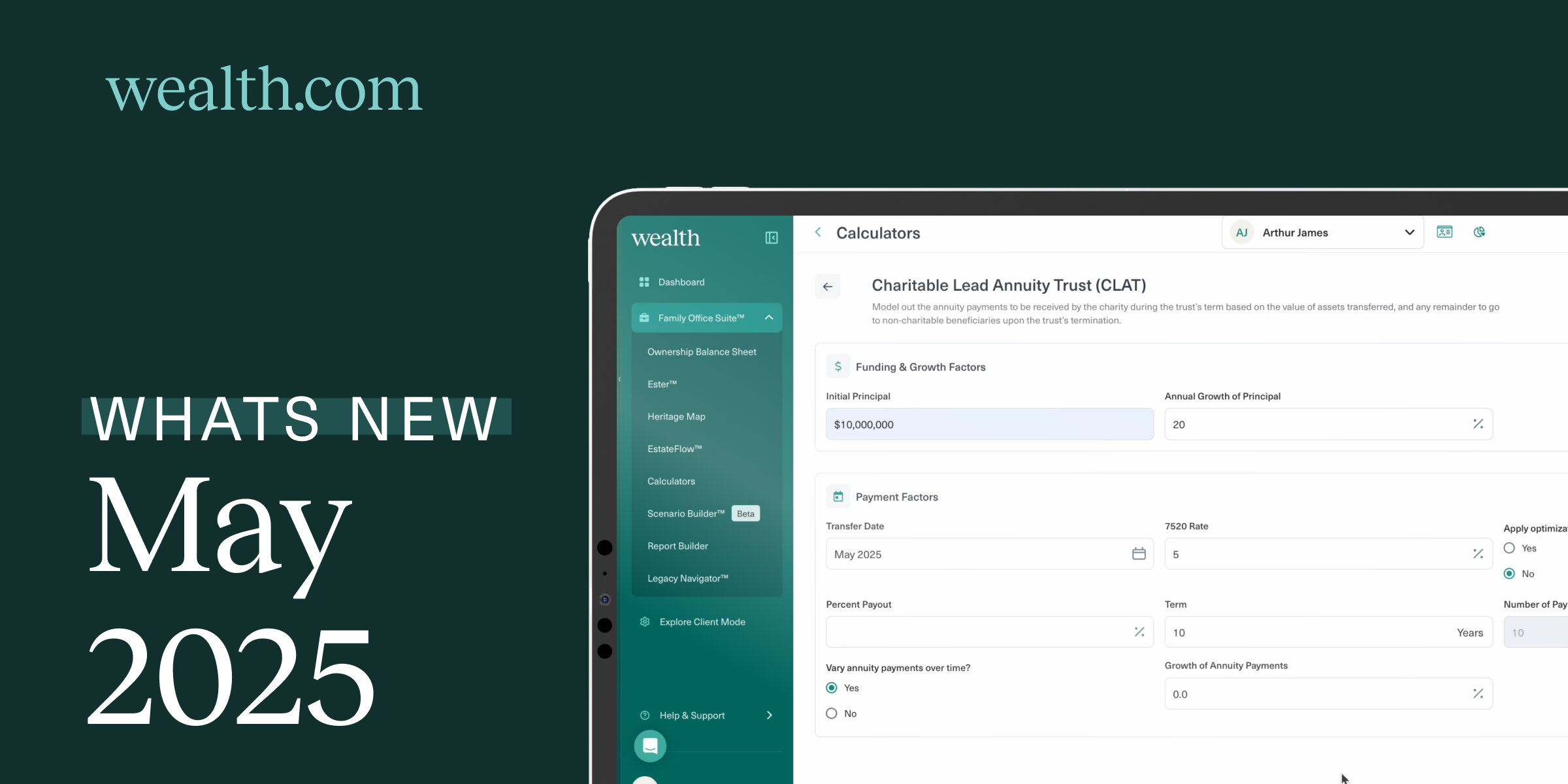
Access Standalone Calculators to consider the impact of state estate taxes, as well as various estate planning strategies, including Grantor Retained Annuity Trusts (GRATs), Spousal Lifetime Access Trusts (SLATs), and more. This means quick, one-off analyses are just a few clicks away—perfect for exploring scenarios or fielding fast client questions without building a full plan.

Ester® Adds Clarity and Confidence

Visual Boundaries for Document Insights:
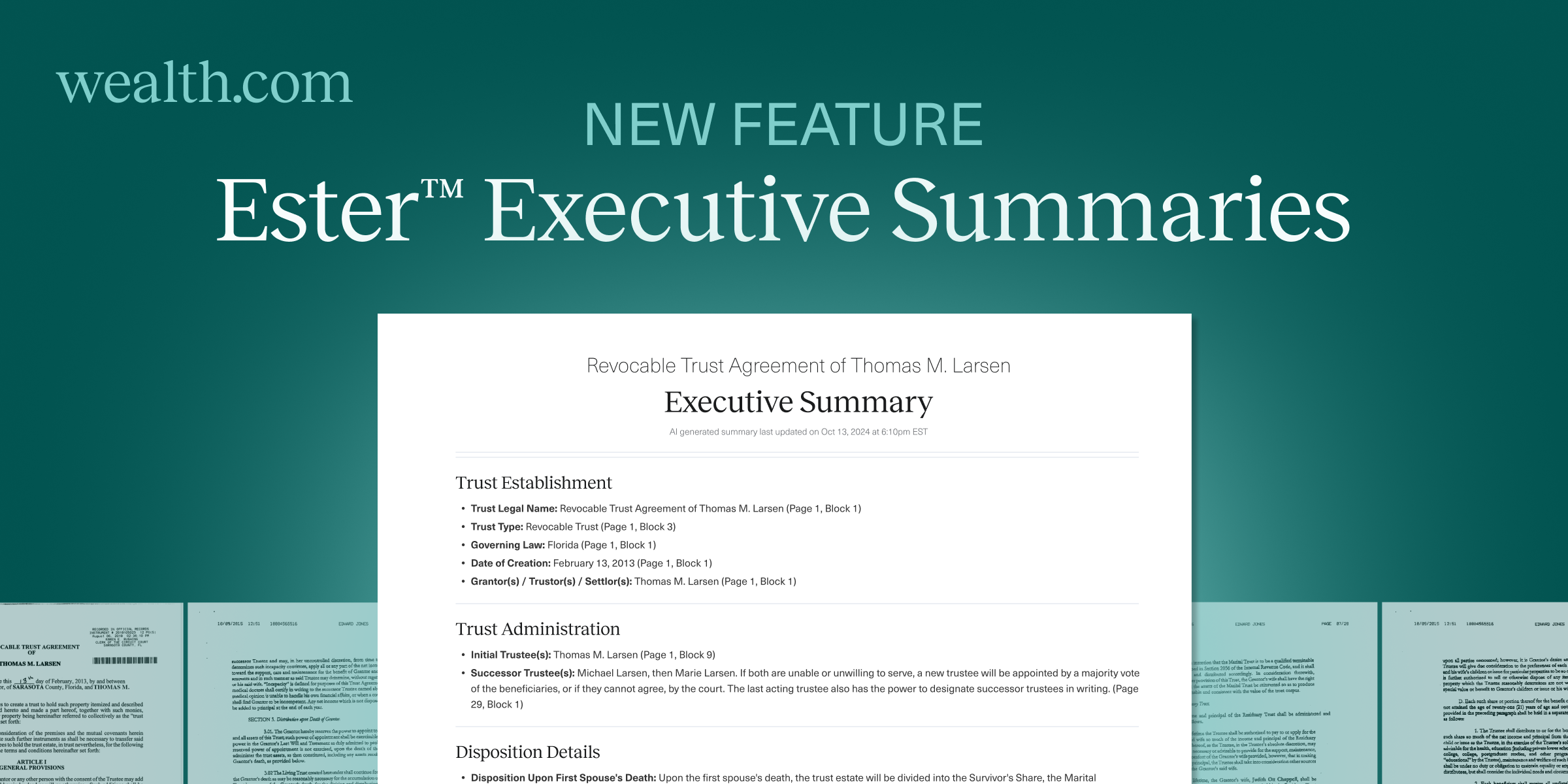
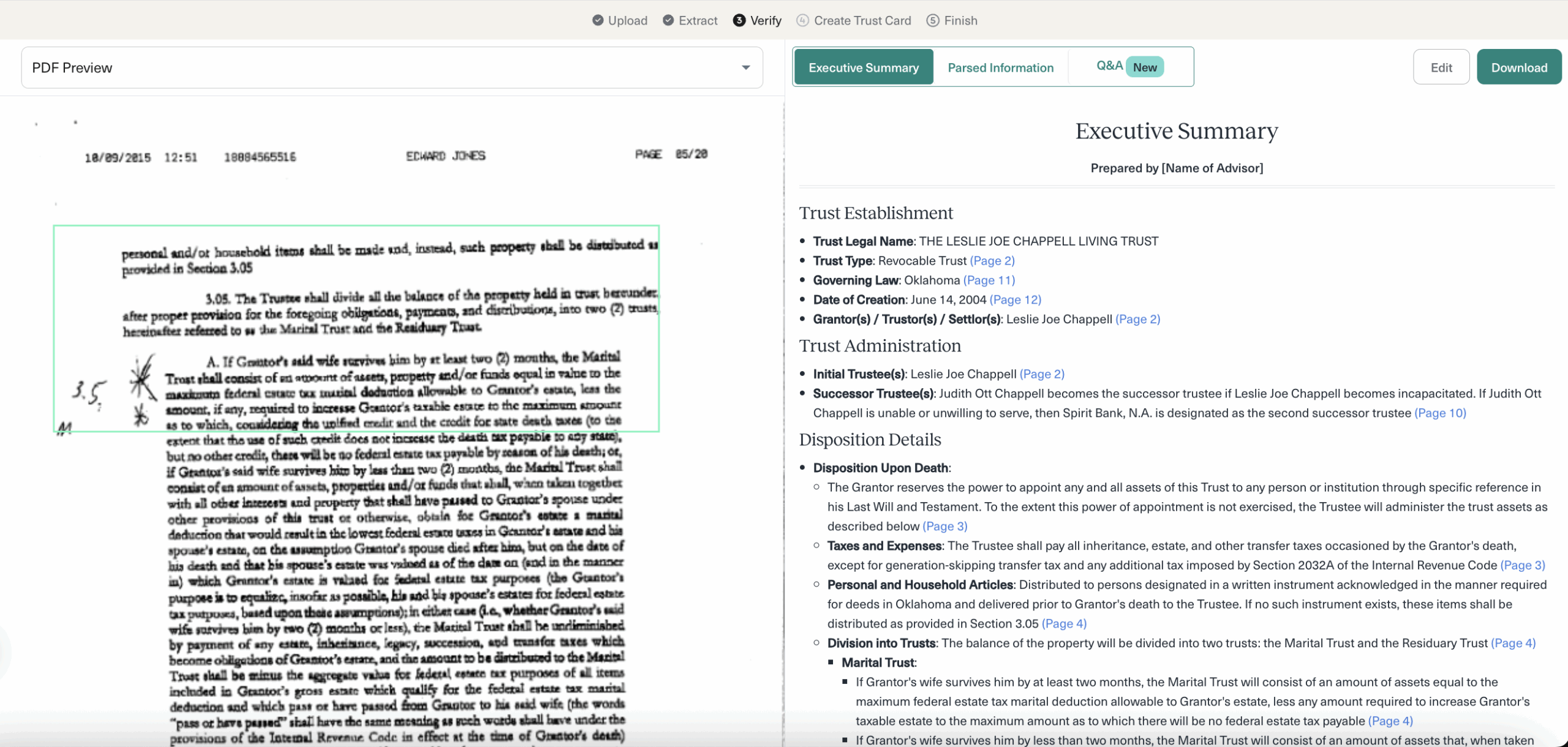
Bounding boxes are back in Ester’s Executive Summary and Q&A, making it crystal clear where information has been pulled from in the source document. This visual cue helps to navigate reviews and confirmation of information with confidence.

New Tools at Your Fingertips

Heritage Map for All Advisors:
The interactive Heritage Map—once exclusive to Family Office SuiteTM Advisors—is now available to all. Simply add your client’s family members to create a family tree visual that you can walk through in detail with your clients. Deepen conversations about legacy planning with your clients by understanding family dynamics and identifying tax efficient ways to transfer assets to beneficiaries.

Smarter Document Workflows

Enhanced Signing Guidance and Consistency:
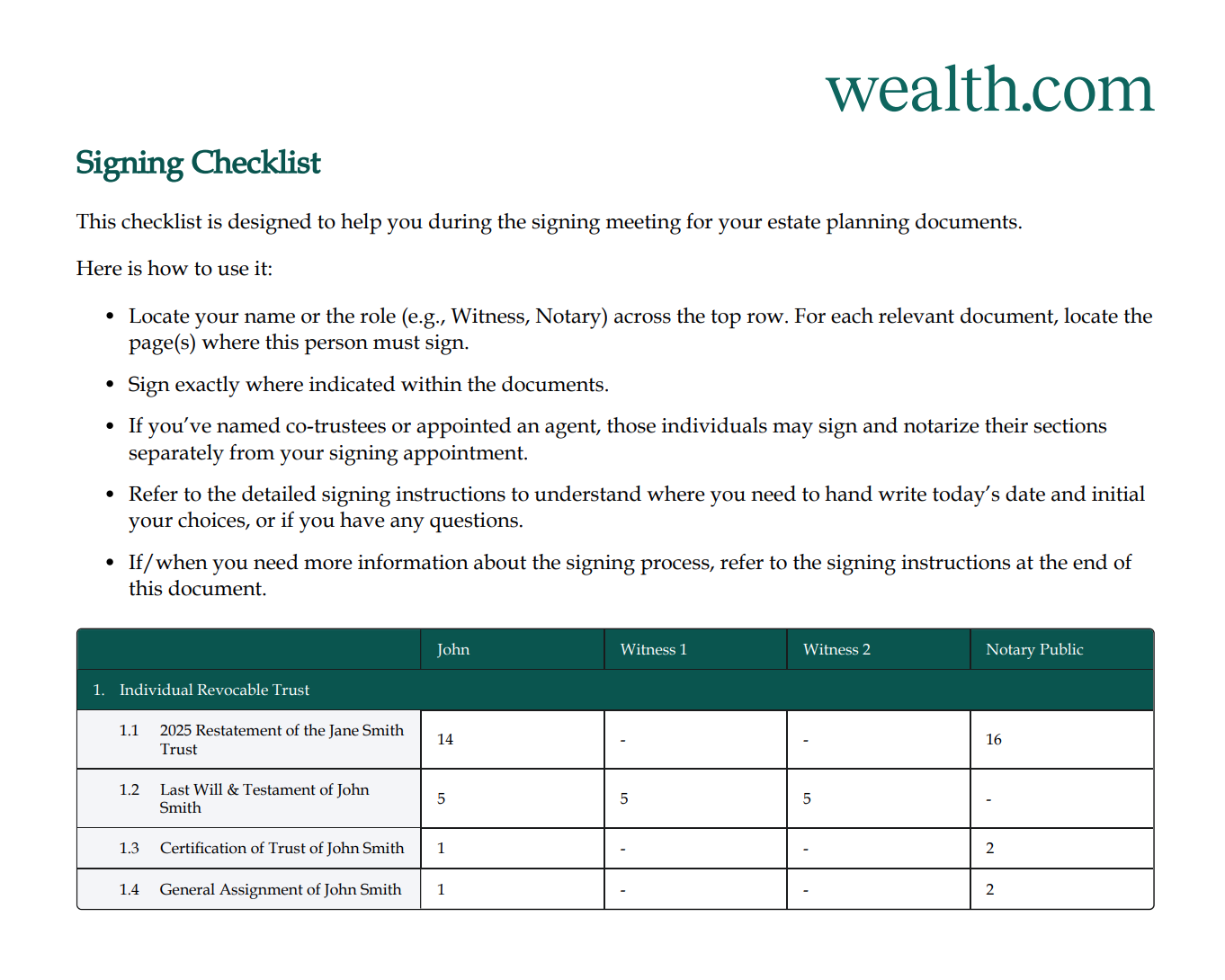
A new document signing checklist embedded directly in Wealth.com documents makes the process clearer for clients to sign their estate planning documents with greater guidance. Expect labeled signature spots, consistent page numbering, and standardized footers across document types.

eMoney Integration Gets Even Smoothe

Prevent Duplicates, Preflight Without Emails:
You can now avoid duplicate contact cards when linking eMoney profiles to existing Wealth clients, and Advisors can now preflight clients even if their eMoney profile lacks an email address.

Try It Today

Log in now to run a quick trust calculation, explore a client group scenario, or review your documents with Ester’s new visual guidance. Everything we shipped this month is designed to make your planning sharper, your conversations clearer, and your workflows smoother. Questions or feedback? Your Partner Success Manager is always just a message away through the in-app chat.

What’s New in April 2025: Ester® Q&A, eMoney integration, and more

Spring is all about fresh starts and this month’s release delivers exactly that. From AI that can field your nuanced estate‑planning questions to a one‑click eMoney integration that auto‑loads client data, we’ve focused on turning hours of manual work into minutes. You’ll also find new ways to customize the Ownership Balance Sheet, tighter guard‑rails that prevent data gaps, and a long list of UX polish inspired directly by your feedback. Dive in below, and let us know what you think!


Ask Ester Anything and Bulk Upload

Free-form Q&A, multiple AI perspectives

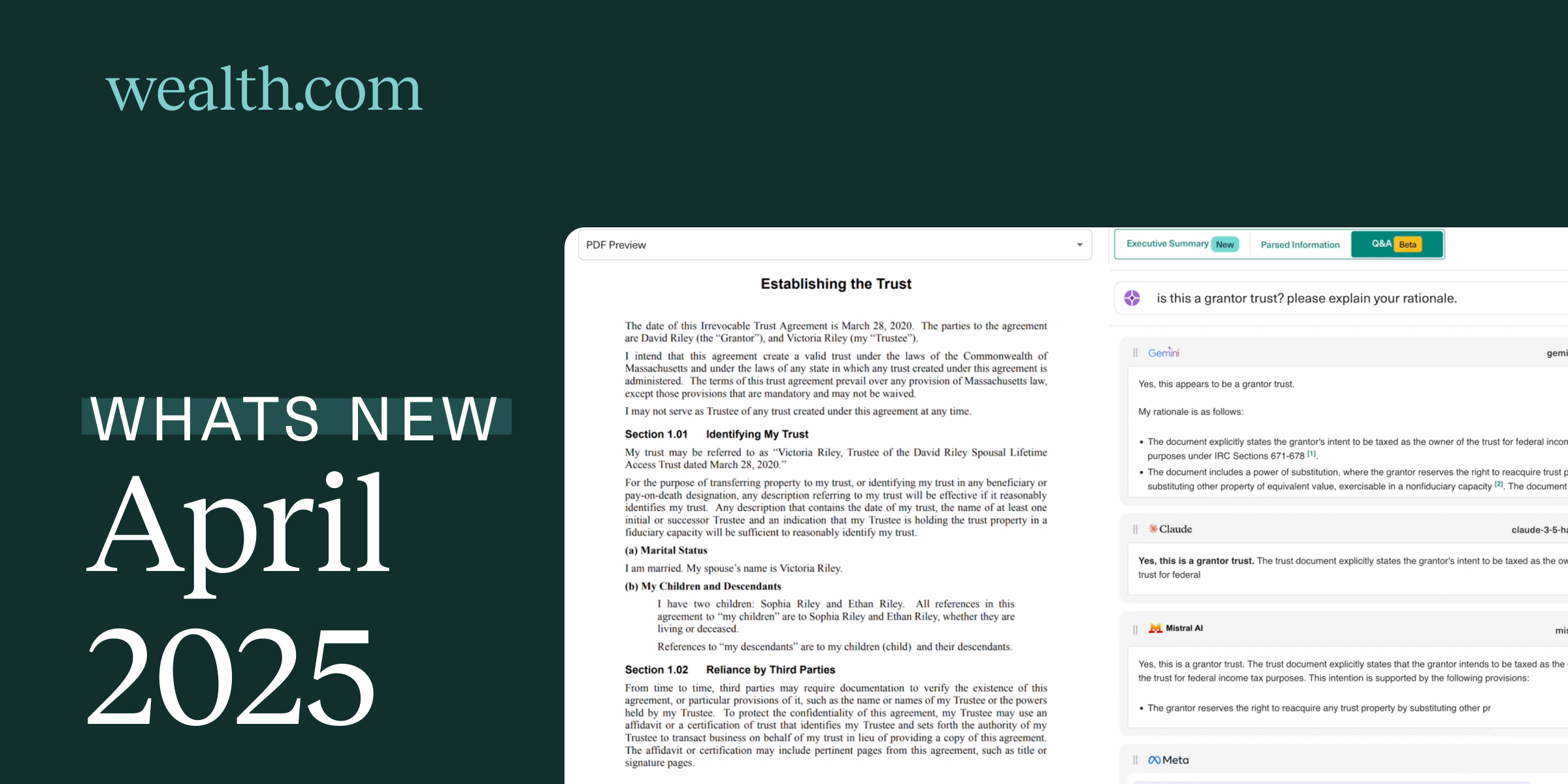
Ester already parses estate‑planning documents and surfaces key details. Now it also answers your open‑ended questions like, “Does this trust allow discretionary distributions?” and shows side‑by‑side answers from four leading models (Gemini, Claude, Mistral, Meta). Compare viewpoints instantly, gain clarity faster.

Review entire document sets at once

Have a client with a will, trust, and healthcare directive? Drag‑and‑drop the whole folder and let Ester run concurrent reviews. No more uploading one file at a time.


eMoney integration: Import Clients & Assets in Seconds

Connect your eMoney credentials, choose the households you want, and watch Wealth.com pull in client profiles and asset data automatically. With live numbers at your fingertips, you can model strategies with confidence. No CSV jockeying required.

Coming soon: two‑way vault sync so the latest documents stay aligned in both platforms.


Ownership Balance Sheet: Customized Visual Enhancements

Advisors can now rearrange the order of columns on the ownership balance sheet making it easier for them to organize the balance sheet based on client preferences. Any changes made to the organization of the balance sheet will also be displayed in Report Builder, using continuity of data structure.

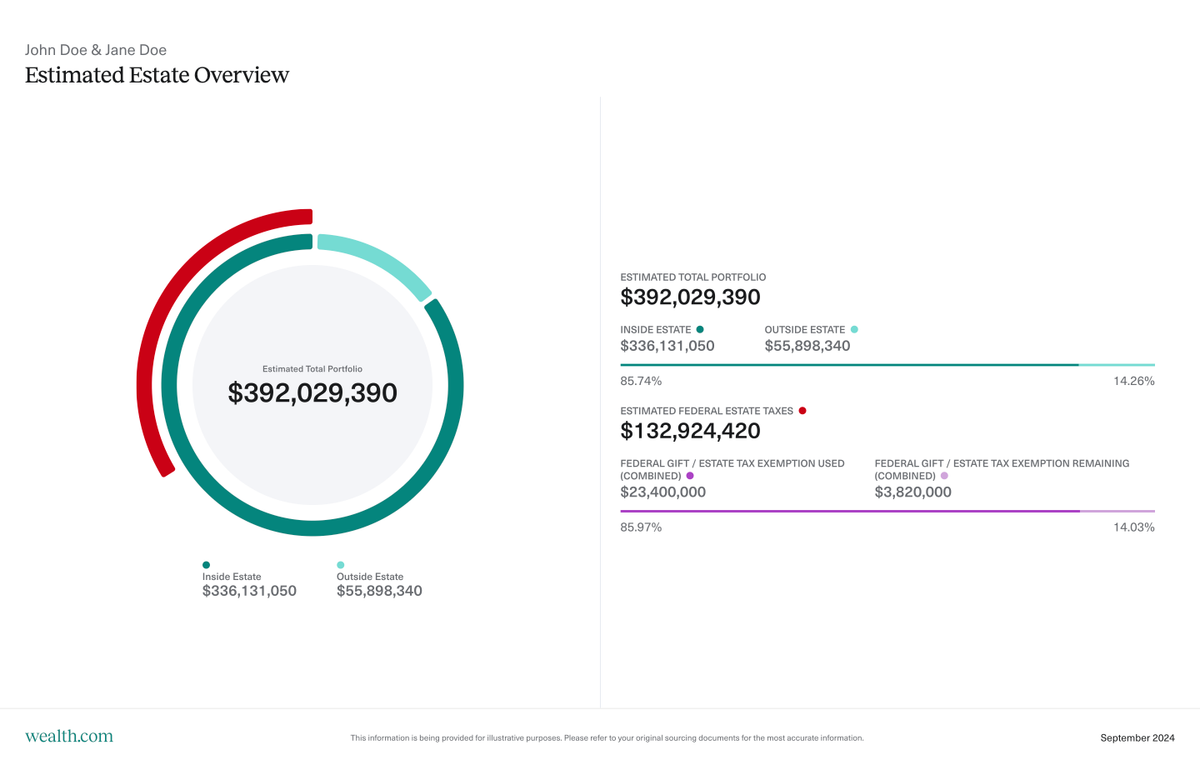
Advisors can also more clearly differentiate between assets that are held inside their clients’ estates compared to assets held outside the estates. This provides a quick visual check when considering different estate planning strategies.


Additional Improvements

  • Smart validations on Asset, Trust, Will and Entity Cards to guide advisors to add missing information and fix errors to ensure that calculations and data flows correctly in EstateFlow and the Report Builder
  • From the Vault, advisors and clients can now upload multiple files at once.
  • From the Report Builder, advisors have the option to save a version of the report to the Vault in a new category ‘Presentation Materials’ for future retrieval and to share with clients, alongside making the Settings and Download to PDF / PPT options more accessible with design tweaks based on user behavior
  • Client profiles minus email: Advisors no longer have to provide an email address for a client when creating their profile in Wealth, streamlining the account creation process for clients who will not be invited to Wealth
  • Estate auto-populate: When an Advisor enters the amount of the exemption a Client has used from the Estate Tax Liability Slide, that value will populate automatically in the EstateFlow configuration panel. The state estate tax rate will also populate based on the Client’s address. This will prevent Advisors from having to manually enter these values in multiple places throughout the platform
  • Historical asset values: Advisors can now select a custom “as of” date on the OBS to show asset values on a certain date, helping them streamline their client reporting.

Try It Today

Sign in and test‑drive today’s release inside your own dashboard. Bulk‑upload a client’s documents to Ester, integrate a household from eMoney, or rearrange the Ownership Balance Sheet to fit your story. As always, every note and idea you send shapes what we build next, so keep the feedback coming through in‑app chat or with your Partner Success Manager.

Wealth.com Announces Strategic Integration With eMoney to Deliver Streamlined AI-Powered Estate and Financial Planning Capabilities for Advisors

PHOENIX – Wealth.com, the leading digital estate planning platform for financial advisors, today announced a strategic integration with eMoney Advisor, a leading provider of technology solutions and services that help people talk about money. This integration will empower financial advisors on the Wealth.com platform to deliver more efficient, accurate and holistic estate and financial planning solutions to their clients. Upon launch, advisors will be able to eliminate manual data entry and ensure real-time synchronization of financial data for a more fully integrated, AI-powered wealth management experience.

“Financial advisors have long been impeded by fragmented tools and time-consuming manual processes that have historically been part of the estate and financial planning process,” said Danny Lohrfink, co-founder and chief product officer at Wealth.com. “Our integration with eMoney eliminates that friction for wealth managers and will help them to deliver more accurate and timely estate planning advice to their clients.”

With this integration, available this month, advisors can incorporate eMoney data within the Wealth.com platform to accomplish the following:

  • Eliminate Duplicative Data Entry: Reduce administrative burden and reclaim time by streamlining workflows across estate and financial planning platforms.
  • Ensure Data Consistency and Integrity: Minimize risk and error with real-time synchronization of key financial data, ensuring advisors and clients always operate from a single source of truth.
  • Deliver a Unified Planning Experience: From the first financial projection to the final legacy document, advisors can now guide clients through a cohesive, tech-enabled journey that builds trust and deepens engagement.

With recent market volatility, firms are increasingly turning to holistic planning as a safe haven to deliver value beyond portfolio performance. Legacy and estate planning have become essential pillars for building client trust and driving long-term retention. This strategic integration between Wealth.com and eMoney empowers firms to offer a unified estate and financial planning experience that helps advisors provide stability, clarity and enduring value in any market environment.

“We’re committed to streamlining and strengthening the financial planning process by offering powerful integrations with premier solutions that address diverse client needs,” said Luke White, group product manager at eMoney. “We’re pleased to offer this integration with Wealth.com to help our joint clients build stronger client relationships through accessible, automated and efficient estate planning.”

Wealth.com is the preferred estate planning platform for more than 800 wealth management firms, continuously increasing its capabilities to further enhance the advisor-client experience. In addition to this strategic integration, Wealth.com recently launched its Scenario Builder tool, the first all-in-one estate planning modeling tool designed to give advisors, wealth planners and estate attorneys insights into the potential impacts of various strategies on a client’s estate. With this partnership and recent innovations, Wealth.com continues to meet the increasing demand for premier estate planning services.

To learn more about Wealth.com’s advanced, end-to-end estate planning platform, please visit Wealth.com.

About wealth.com

Wealth.com is the industry’s leading estate planning platform, empowering 800+ wealth management firms to modernize the delivery of estate planning guidance to their clients. As the only tech-led, end-to-end estate planning platform built specifically for financial institutions, Wealth.com helps drive scale and efficiency, meeting client needs across the wealth spectrum. Financial advisors ranked Wealth.com as the #1 estate planning platform in the 2024 T3/Inside Information Advisor Software Survey. In 2024, Wealth.com was honored by WealthManagement.com as the ‘Best Technology Provider’ in the Trust category, and CEO Rafael Loureiro received the Advisor Choice Award for Technology Providers: CEO of the Year.

About eMoney Advisor, LLC

eMoney Advisor, LLC (“eMoney”), based in Conshohocken, Pennsylvania, is the only wealth-planning system for financial advisors that offers superior transparency, accessibility, security, and organization for everything that affects their clients’ financial lives. A technology envisioned and created by advisors for advisors, eMoney’s award-winning software and resources are tailored to transform the advisor’s ability to implement comprehensive financial plans and prepare their clients for a secure financial future. For more information, please visit: www.emoneyadvisor.com.

Contacts

MEDIA CONTACT:

StreetCred PR
[email protected]

Hannah Dixon
317-590-0915
[email protected]

Rob Farmer
415-377-3293
[email protected]

What’s New, March 2025: Smarter reports, enhanced Ester®, estate modeling & more

March Madness is here, and our product team has been on a tear, rolling out updates to make estate planning smoother and more intuitive. Advisors now have more ways to customize client-facing reports, organize documents, and streamline client data entry.

See all the latest updates below.

Scenario Builder: Model, Compare & Optimize Estate Strategies

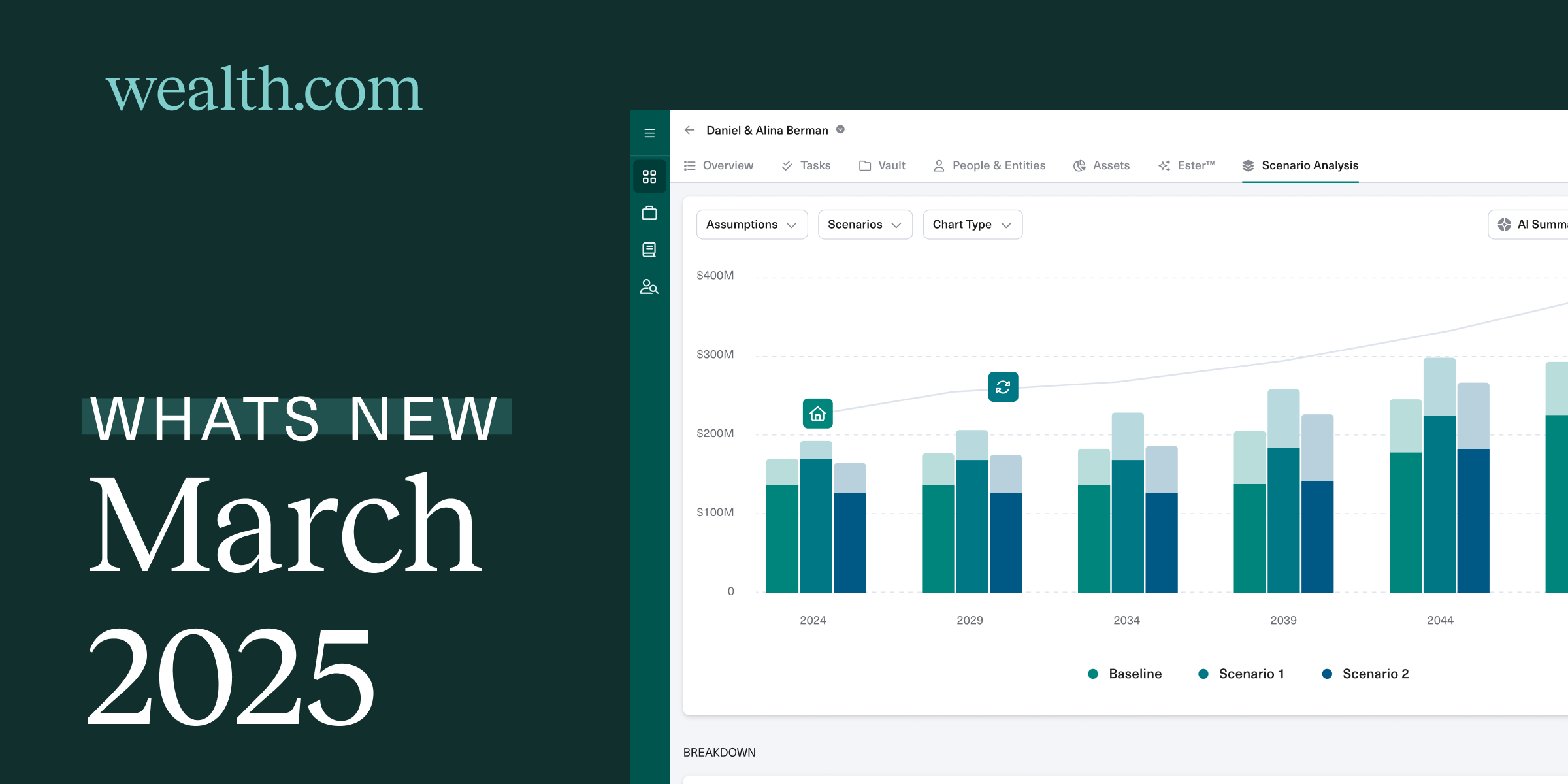
Advisors need a powerful tool to help clients understand the impact of different estate planning strategies. Scenario Builder gives you an instant, side-by-side view of potential outcomes, helping you proactively discuss ways to preserve wealth and reduce estate tax liability.

With real-time calculations, you can model future events, such as asset growth and liquidity events, alongside sophisticated strategies like various irrevocable trust structures. The ability to instantly update scenarios allows you to adjust inputs on the fly and compare different scenarios in a clear, client-friendly visualization.

Report Builder: Presentation edits & privacy settings

We’ve made two major improvements to Report Builder, giving you more control over client presentations.

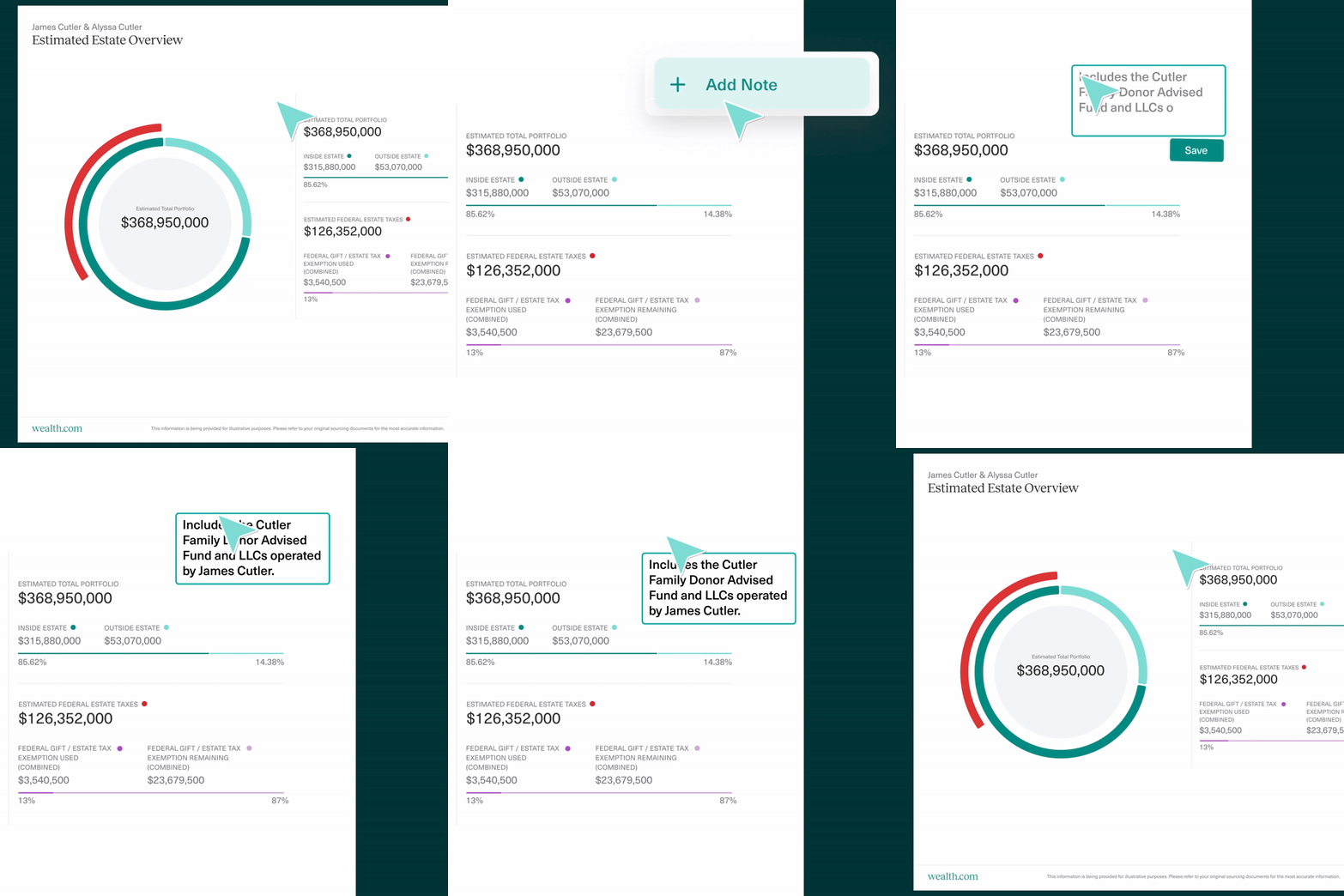
Editable presentation layer: Now you can add notes and comments directly into visualizations to clarify key details for your clients. These notes are included when downloading reports as PDFs or PowerPoints.

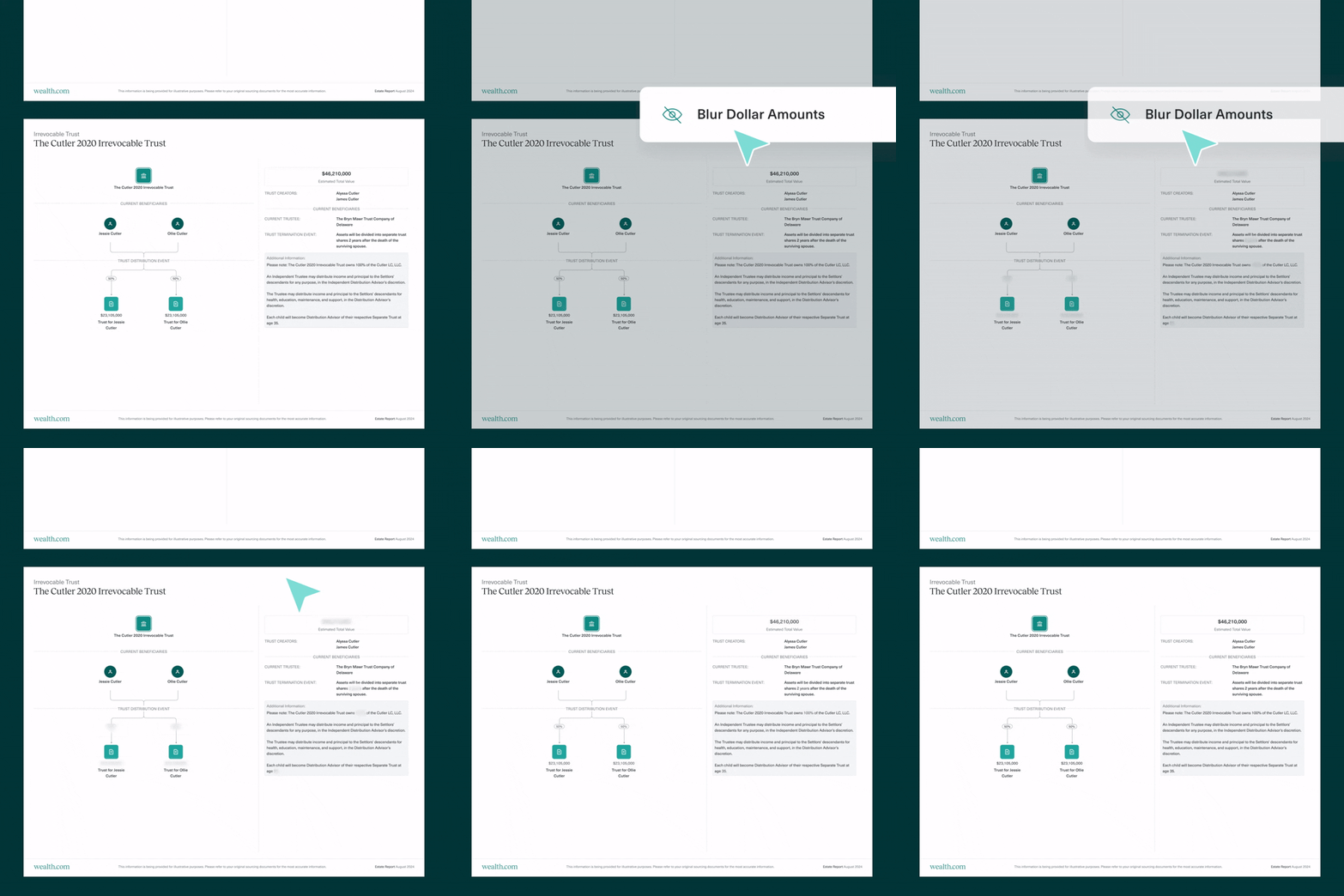
Blurred dollar amounts:

A new setting lets you blur dollar amounts in reports. The toggle is off by default but can be enabled in settings to preserve privacy when sharing estate details with collaborators or beneficiaries.

Ester®: Will and pour-over will differentiation

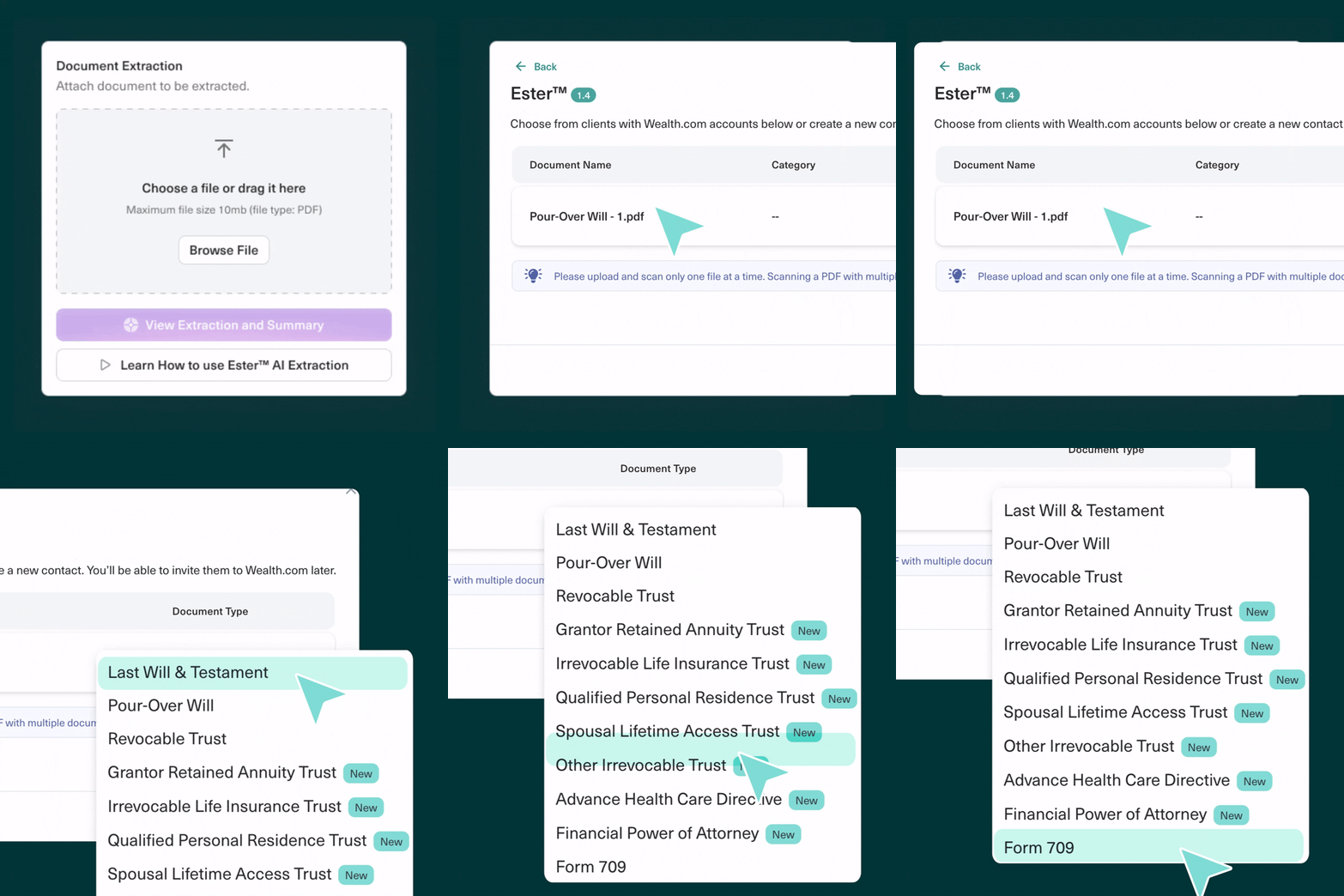
When uploading a will to Ester, you can now specify whether it’s a standard will or a pour-over will.

Pour-over wills will be automatically saved in the Revocable Trusts & Supporting Documents section of a client’s Vault, while standard wills will be stored under Wills, making it easier to keep everything organized.

Ownership Balance Sheet: Improved CSV upload template

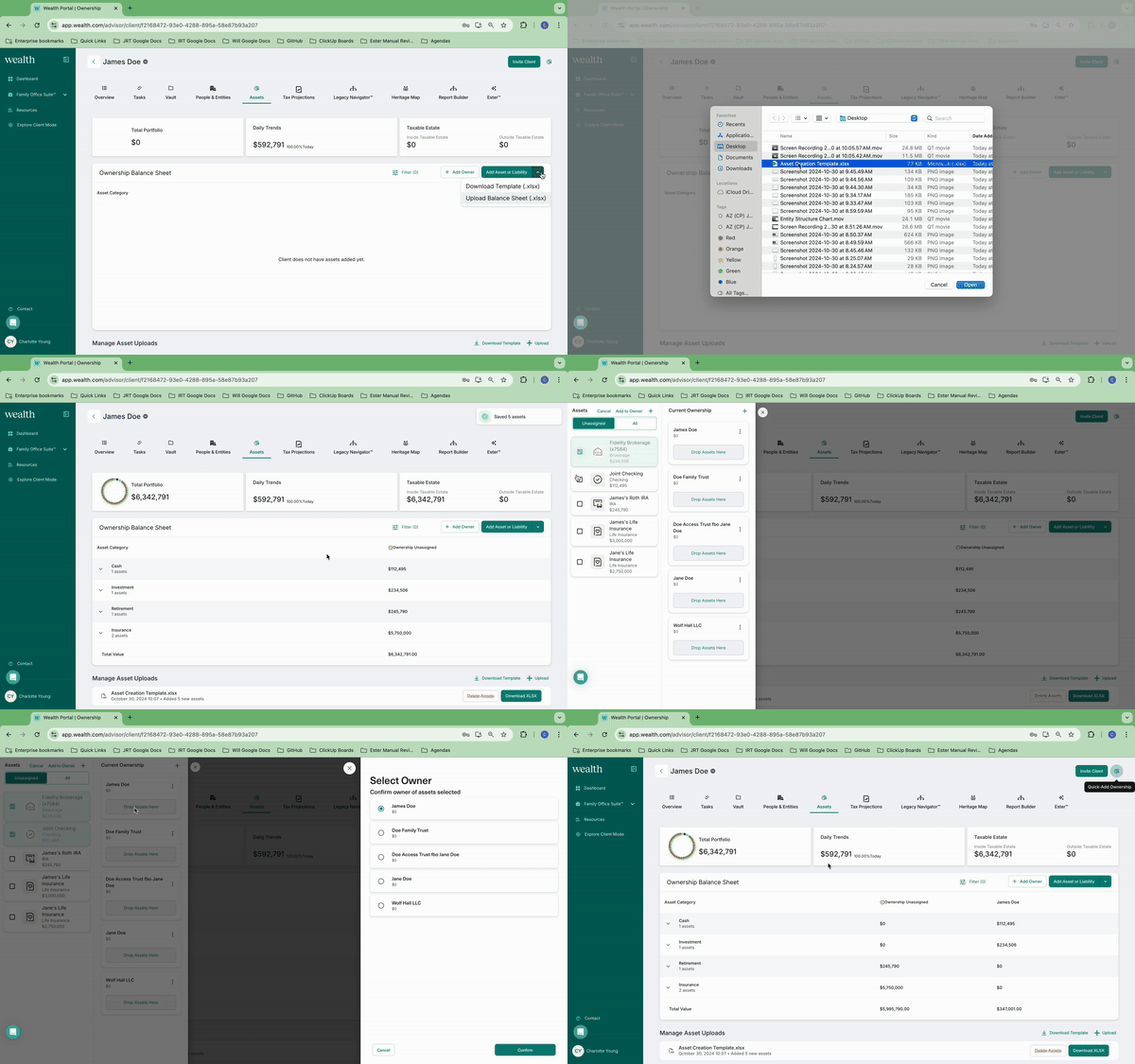
We’ve improved the CSV upload template for assets to make data entry faster and more intuitive.

Now, when you select Upload in the Ownership Balance Sheet, you’ll have access to a refined template that includes additional details about ownership, entities, and contacts. This makes it easier to build a client’s financial picture while reducing manual data entry.

Additional updates this month

  • Ester auto-reprocessing: If Ester tries to analyze a document before it’s fully encrypted in the Vault, Ester will now automatically reprocess it, ensuring a smoother extraction process.
  • Beneficiary update warning: We’ve added a new warning modal to clarify that changing specific gift, residuary, or ultimate beneficiaries will replace Ester-generated summaries with your new details. This helps prevent confusion between AI-generated and manually entered information
  • New privacy settings: A new privacy option is now available in advisor settings, client settings, and client footer, giving you more control over how we use cookies.
  • Collapsible sub-trust sections: Sub-trust sections in contact cards are now collapsible and color-coded to match flow charts in Report Builder, making it easier to organize beneficiaries.
  • Hover-to-view full names: When selecting a card from People & Entities, longer names now appear in full when hovering, helping you differentiate between entities with similar naming conventions, such as trusts.

Want to learn more about these exciting updates and more? Book a personalized demo today.

Announcing Scenario Builder

Announcing Scenario Builder: Instantly Model, Compare, and Optimize Complex Estate Strategies

We’re excited to introduce Scenario Builder, the first estate plan modeling tool that instantly gives financial advisors and attorneys a clear view of the potential outcomes of different estate planning strategies. This powerful tool enables you to compare techniques side by side, equipping you with transparent, data-backed insights to help clients make informed decisions.

Scenario Builder calculates estate tax implications in real time, incorporates future financial events, and lets you adjust key assumptions over time. You can easily modify variables—such as asset growth, tax rates, and liquidity events—to model different strategies with greater precision.

You can build upon any client’s existing estate plans and explore new planning strategies, fostering proactive discussions about preserving wealth while reducing estate tax liability.

Transforming how advisors and attorneys model estate plans

There has never been a centralized way to view a client’s current estate plan, project it into the future, and layer on new strategies or key events to see how they compare—until now. Scenario Builder fills this gap by providing a centralized platform that runs complex calculations instantly and delivers real-time insights on estate planning strategies.

Scenario Builder allows you to:

Compare complex estate planning strategies: Simulate sophisticated planning techniques, by modeling scenarios, including Grantor Retained Annuity Trusts (GRATs), Charitable Lead Annuity Trusts (CLATs), Spousal Lifetime Access Trusts (SLATs), Dynasty Trusts, Irrevocable Life Insurance Trusts (ILITS), and more. Demonstrate the impact of advanced strategies individually or layer multiple techniques to see how they work together, all with personalized projections.

Calculate and visualize tax implications, wealth transfer efficiencies, and more: Automate the complexity of estate planning calculations in a single, centralized platform, eliminating the need to manually run calculations across multiple applications and then formatting them for client-facing reports.

Proactively plan for future events: Incorporate anticipated events such as asset sales, major gifts or charitable pledges—and better understand how they impact your client’s estate value and tax liability.

Instantly compare the impact of estate planning strategies: Test multiple scenarios side by side to uncover key insights and refine strategies based on real data. Adjust variables like asset growth rates, life expectancy, state residency, and estate tax exemptions to create tailored, data-driven projections.

Advisors can now analyze the impacts of these potentials more precisely and share with clients in a clear, visual way within minutes.

How Scenario Builder works

While Scenario Builder runs complex calculations in an instant, the user experience stays simple. In just four steps, you can generate clear, personalized insights for your clients:

  1. Establish a baseline: Scenario Builder automatically pulls in key details from your client’s personal information, including financial data and estate documents, to create an accurate foundation to compare scenarios against.
  2. Create and customize scenarios: Model multiple strategies, refine existing ones, and layer in real-world factors like asset sales, inheritances, liquidity events, or changes in state residency to see how they impact long-term outcomes.
  3. Compare side by side: Instantly generated visuals highlight key differences, from estate tax exposure to portfolio growth, so you can assess and adjust variables to refine strategies.
  4. Generate client-ready reports: Seamlessly export scenario comparisons into PDF or PowerPoint to make complex estate planning decisions easy to communicate.

A simpler way to model estate strategies for every client

Scenario Builder is a powerful tool for all client types—whether they have complex or relatively simple estates. For High Net Worth and Ultra High Net Worth clients who are concerned about potential estate tax liability or want better control over their distributions to beneficiaries or charities, advisors can now provide greater insight and precision into the impacts different strategies will have that align with the client’s goals.

However, even clients with simpler estates may have questions about the impact future events, like relocation to another state or a liquidity windfall, have on their estate plan. Or they may have a blended family and want to model potential strategies for best handling future distributions.

With Scenario Builder, advisors can guide clients through complex estate planning decisions with unparalleled precision, clarity, and confidence.

Scenario Builder is being rolled out in the coming weeks. To get an exclusive look at how it works, book a personalized demo today.

What’s New, February 2025: Ester® Enhancements, Task Manager & Document Creation Updates

We’re kicking off the year with major updates to Ester®, our AI legal assistant, Task Manager, and our document creation process. These enhancements empower financial advisors to deliver a better estate planning experience for their clients while providing key insights. Here’s what’s new.

Ester Updates: Now Available for All Irrevocable Trust Types and Expanded Visualization Capabilities

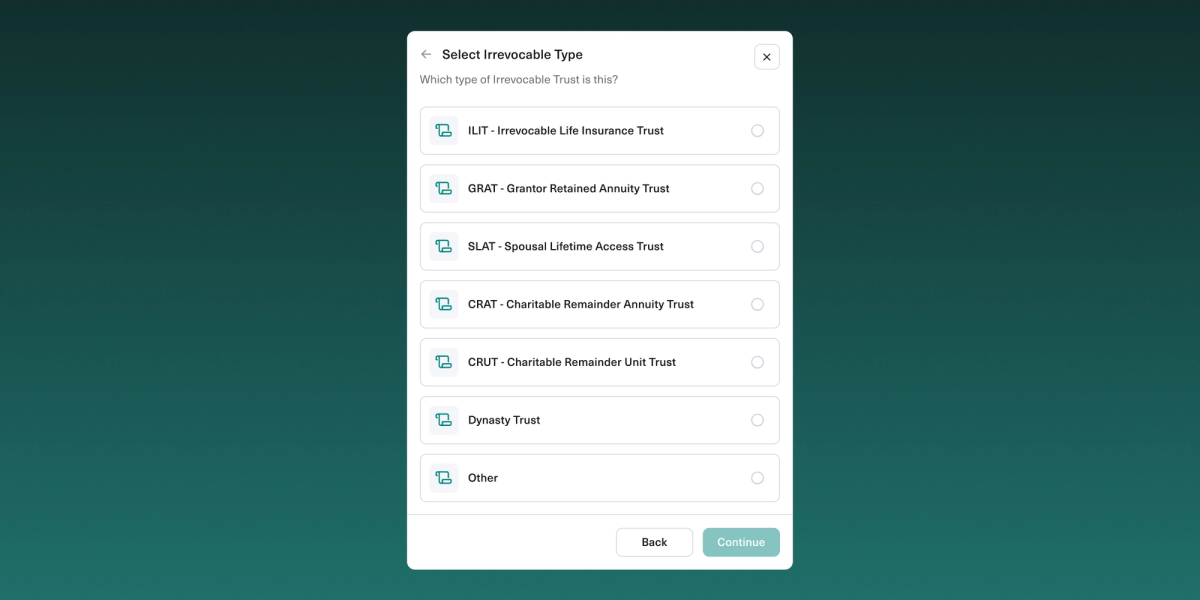
We’ve expanded the capabilities of our recently announced Ester® Executive Summaries—single page summaries that distill the key decisions in estate planning documents—to support all irrevocable trust types.

In addition to already supporting GRATs, ILITs, and SLATs, advisors can now leverage Ester to produce Executive Summaries for QPRTs, CRATs, CRUTs, Dynasty Trusts and more.
Wealth.com's Ester AI now supports extraction for all irrevocable trust types.
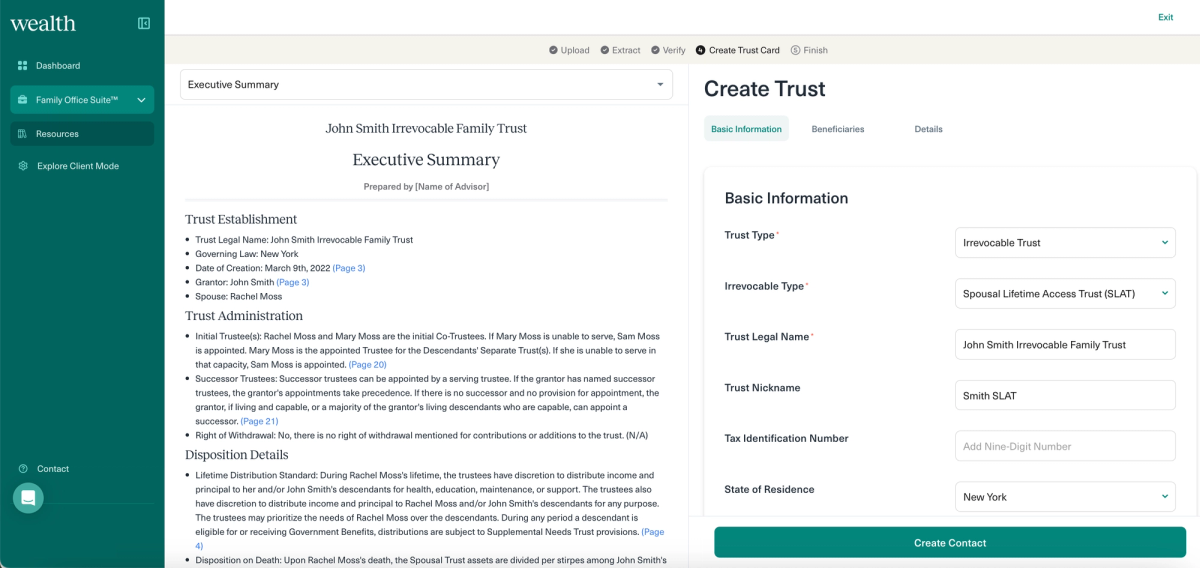
Ester has also been updated for those with Family Office Suite™ to easily feed the extracted information from these irrevocable trust types in the Executive Summary to visualizations for a client-facing report.

Wealth.com Ester AI Executive Summary now allows for fast trust details to be used for visualizations and Report Builder
Advisors can now view a “split-screen” of the Executive Summary on one side and the ability to fill in a Trust Card on the right side. This allows easy data-transfer to feed a client’s trust information into the Report Builder and making sure that information is saved. In a future update, the Trust Card will be pre-filled by our AI.

Task Manager: Link Files to a Task

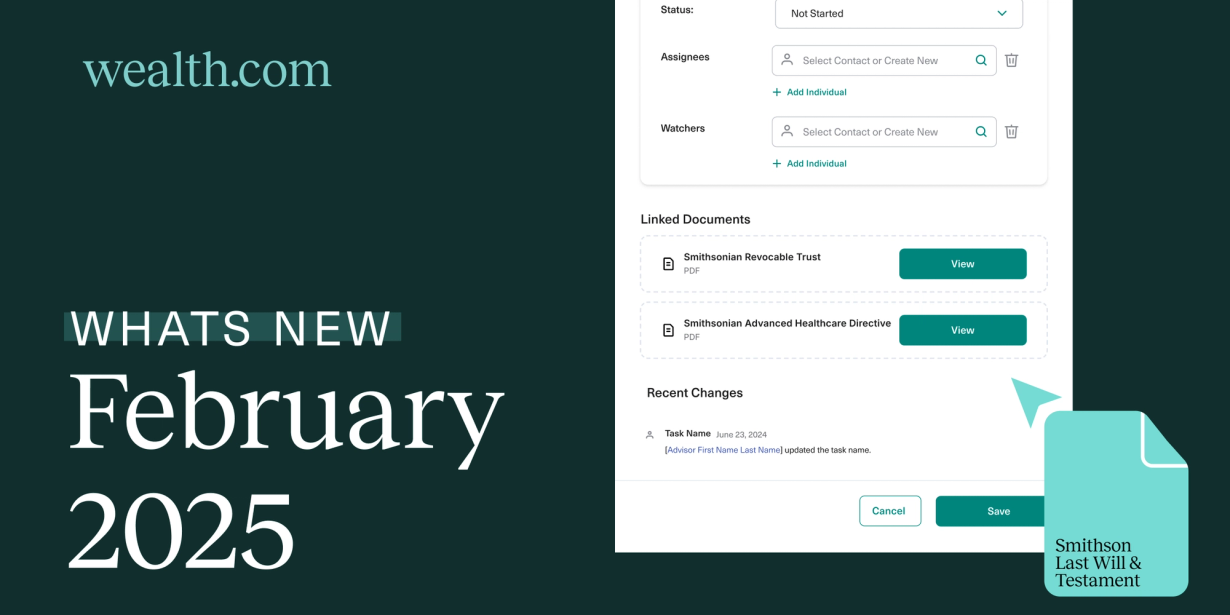
We’ve updated Task Manager so that advisors can now link files to a task. A file can be added when the task is created, at a later time, as well as tasks created by colleagues that they have access to.

Wealth.com Task Manager now allows file attachments on tasks
For example, an advisor could attach a scanned PDF of a client’s existing trust document to a task to assign to a teammate to run through Ester and review. Or they could raise a task for someone to upload completed estate planning documents to a client’s Vault. When the task is marked as completed, the advisor who created it can cross-reference the linked files to confirm.

Document Creation: State-Specific Updates

In our efforts to continuously keep our documents up-to-date and in accordance with local legislation, we have made updates to our documents for members who live in Oklahoma. These updates have been reviewed and recommended by our local counsel.

Reflection & Momentum: 2024 in Review and What’s Ahead for 2025

2024 was a groundbreaking year for wealth.com, revolutionizing how wealth managers and estate planning come together through innovative technology. As the Great Wealth Transfer continues, estate planning has become essential for advisors aiming to elevate client satisfaction and engage the next generation.

Our success is thanks to our growing network of wealth management and advisor partners who trust in the power of estate planning and wealth.com’s ability to deliver for them and their clients.

To our clients, partners, and the wealth management community we connected with: thank you for making 2024 unforgettable. The entire wealth.com team is dedicated to continually innovating and improving the estate planning experience, and we can’t wait to show you what we’re working on in 2025.

First, here’s a look back at our highlights and accomplishments from the past year:

2024 was a year of innovation, recognition and growth

The wealth.com team hit the ground running in 2024. We doubled down on innovation, consistently releasing product features to improve the estate planning process for advisors and having life-changing impacts for their clients.

Our hard work was rewarded with recognition from industry leaders and wealth.com was firmly established as the leading digital estate planning platform.

We also attended and spoke at events across the country, worked closely with fantastic partners within the industry, grew our Practical Planner podcast and more—culminating in a Series A led by Google Ventures and other leading tech investors.

wealth.com team at Charles Schwab conference in San Francisco

Top product announcements

Family Office Suite™

Our Family Office Suite™introduced the industry’s first collection of estate management of technologies for highly complex estates. Since released, it has enabled advisors to streamline estate management by seamlessly collecting, structuring and visualizing data from a client’s estate plan—and delivering it in all in elegant, customizable reports to enhance wealth transfer conversations.

Ester™ AI enhancements

We invested heavily in Ester™, our AI legal assistant tool, that enables advisors to work smarter by automating manual processes, namely reviewing estate planning documents. This year we launched:

  • Executive Summaries: Single-page, client-ready summaries of documents.
  • Automatic Contact Card creation for key decision makers and others named in documents, such as trustees and family members.
  • Expanded extraction capabilities to new document types, including Irrevocable Trusts (GRATs, ILITs and SLATs), Advanced Health Care Directives and Financial Powers of Attorney.

Document Creation improvements

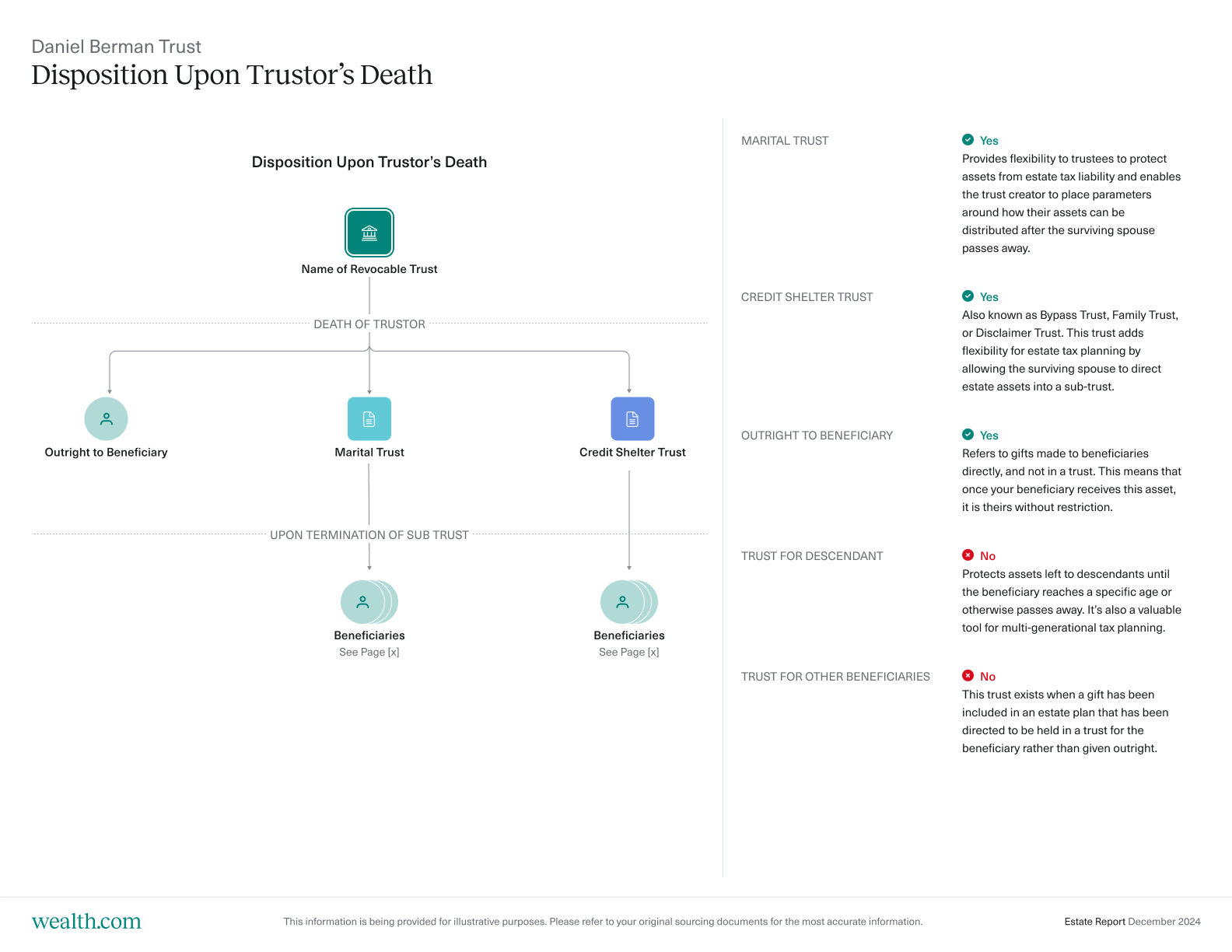
We furthered our industry-leading document creation capabilities last year. This included allowing for greater customizations in our Revocable Trusts and Last Wills & Testaments, such as the ability to add Marital Trusts, Trust for Descendants, name contingent and ultimate beneficiaries in the event no primary beneficiaries are named (also known as a “disaster” clause).

We also refined the client onboarding experience to help them confidently navigate their estate planning journey by simplifying questions asked, providing more educational materials and allowing them to review and confirm their document recommendations.

Awards, announcements & media

Wealth.com founders at GV (Google Ventures) office in the Ferry Building in San Francisco after Series A announcement

Last year, wealth.com made waves in the industry with exciting awards, big partnership announcements and plenty of media buzz.

Announcements

It goes without saying, the most exciting announcement last year was our $30M Series A. The round was led by GV (Google Ventures), along with Citi Ventures, Outpost Ventures, Fifty Three Stations and Firebolt Ventures. It was a pivotal moment for wealth.com and our journey to reimagine estate planning, as well as setting the stage to even bigger in 2025.

We also announced a number of exciting partnerships, including:

Awards

We’re thrilled and grateful for the recognition our product and leadership team received last year. It’s exciting to see industry leaders and peers acknowledge our achievements and the hard work the entire wealth.com team puts in every day to build the best solution.

Here are some highlights from 2024:

In the media

Wealth.com was featured in nearly two hundred media mentions in 2024, including nationally recognized and industry-leading publications such as WealthManagement.com, CityWire RIA, ThinkAdvisor, Axios, Financial Planning, InvestmentNews, Barron’s and more.

We’re continuously engaging reporters to provide education on how advisors can best serve their clients through estate planning strategies. You can find all our latest news on our Press Page.

On the road

Wealth.com at FutureProof in 2024

If you ran into a wealth.com team member in 2024, it’s no surprise—we were everywhere! From speaking on stages to building connections and handing out fan-favorite swag (shoutout to the lucky surfboard winner at FutureProof 2024), we made the most of nearly two dozen events.

And we’re just getting started. In 2025, we’ll be hitting the road even more, so keep an eye out. We can’t wait to reconnect and meet new faces along the way!

What we’re focused on in 2025

2024 was just the start for wealth.com and we’re building on the momentum for 2025. This year, we’re raising the bar with exciting announcements, feature updates, and more. While we can’t reveal everything just yet, here’s a what you can expect from us:

Continuing to lead the industry in innovation

With the Family Office Suite™, the industry leading AI, and unmatched document creation capabilities, wealth.com stands as the only true end-to-end estate planning solution. This year, we’re doubling down our focus on rolling out features designed to serve all clients, from the UHNW to the mass affluent, helping advisors streamline their businesses and achieve true scale.

This year, you can expect to see us:

  • Introducing greater flexibility to customize your clients’ use cases, from document creation to reporting.
  • Expanding your strategic capabilities for estate and tax planning in the platform.
  • Adding more integrations to streamline your planning and collaboration processes.
  • These are only the tip of the iceberg. We’re making bold moves to innovate and solidify wealth.com as the ultimate estate planning platform for advisors and their clients.
  • Empowering advisors with unmatched support and resources

At wealth.com, we’re passionate about helping our advisor partners excel to both maximize the value of our platform and deliver an exceptional client experience. In 2025, we’re focused on expanding educational resources by launching Wealth.com Workshops—an exclusive series of virtual events designed to unlock the full potential of estate planning.

Early pilot sessions showed incredible engagement, and we’re excited to make this a cornerstone of the advisor experience.

We’re committed to making every wealth.com interaction seamless and rewarding. Stay tuned for more exciting updates as we continue to improve the advisor experience.

Harnessing AI to transform estate planning

Ester™ isn’t going anywhere—in fact, it’s just getting started. We believe AI is key to enhancing the wealth.com experience for advisors and the value they bring to their clients. This year, our AI team will be working hard to expand Ester™’s capabilities and integrate AI more deeply across the platform.

Events, events & even more events

It’s a good thing the wealth.com team can’t sit still because they’ll be criss-crossing the country attending all of the hottest wealth management events.

Here’s where we’ll be in the next few months—if you’re there, come say hi!

The best is yet to come

2024 just set the stage for wealth.com, and the importance of estate planning in holistic wealth management. But our focus continues to be on you—the advisor, the wealth manager and your clients. Your success is our reward and we couldn’t have achieved the amazing things in 2024 without our amazing clients and partners. We can’t wait to show you what we’re working on this year and to help you achieve even better results for your clients and your business.
What’s New at Wealth.com, December 2024: Ester® Executive Summaries, Task Center Collaboration & More

As we close out 2024, we’re excited to share the latest product innovations for advisors to leverage in the coming year oversee their clients’ estate plan creation and management. These new releases—from major AI enhancements to increased collaboration functions—are designed to enable advisors to streamline the estate planning process to optimize for efficiency to drive client satisfaction.

Generate easy-to-read summaries with Ester®, including expansion to support Irrevocable Trusts

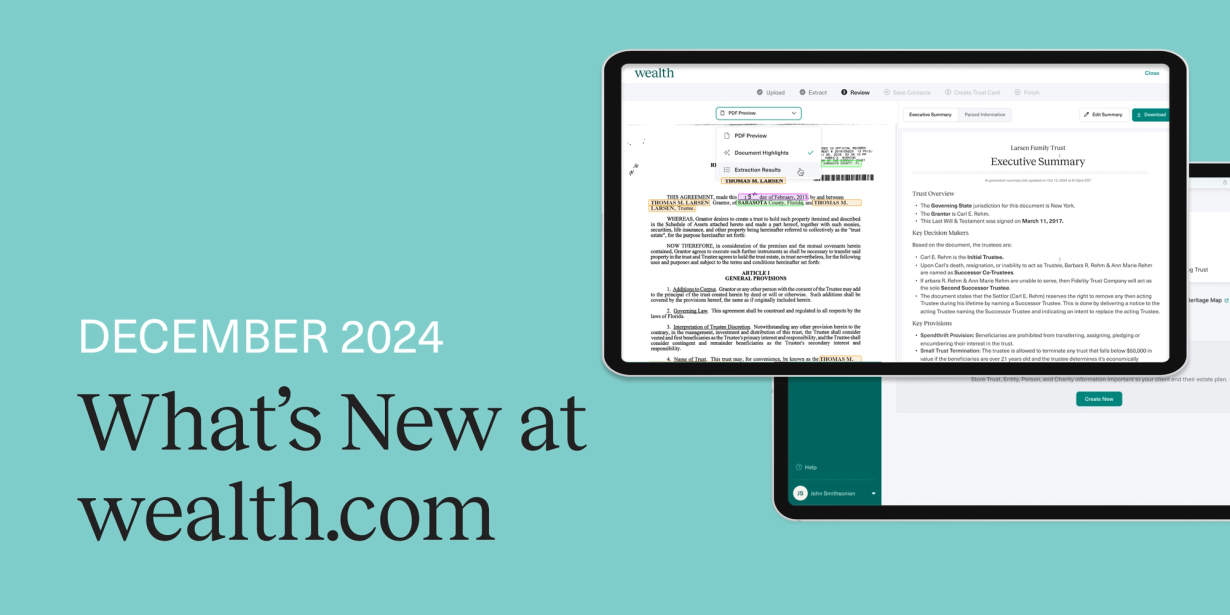
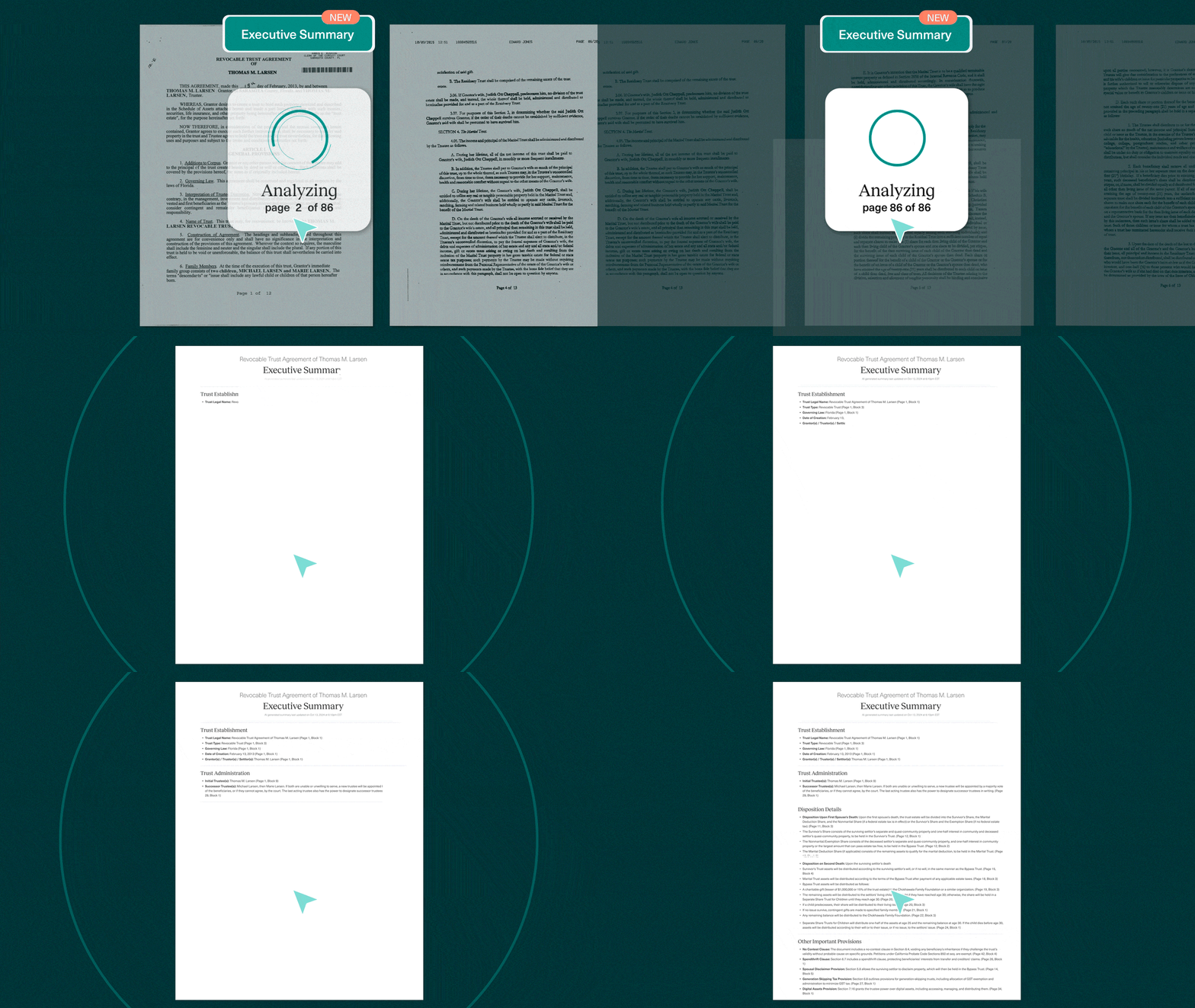
wealth.com's Ester™ AI Executive Summary feature, a concise overview of extracted information from estate planning documents

We recently announced the ability to generate Executive Summaries with Ester, our AI assistant. The Executive Summary is available to be used for new document types, including Grantor Retained Annuity Trusts (GRATs), Irrevocable Life Insurance Trusts (ILITs) and Spousal Lifetime Access Trusts (SLATs).

This advancement with Ester is a game-changer for advisors, synthesizing even the most complex documents to transform provisions to be comprehensible, offering deeper insights,and feeding into automatically generated visualizations to be included in reporting.

You can read more about this release, and the completely redesigned Ester Visualizer Report, here.

Collaborate with the Task Center: Create tasks, add assignees & email notifications

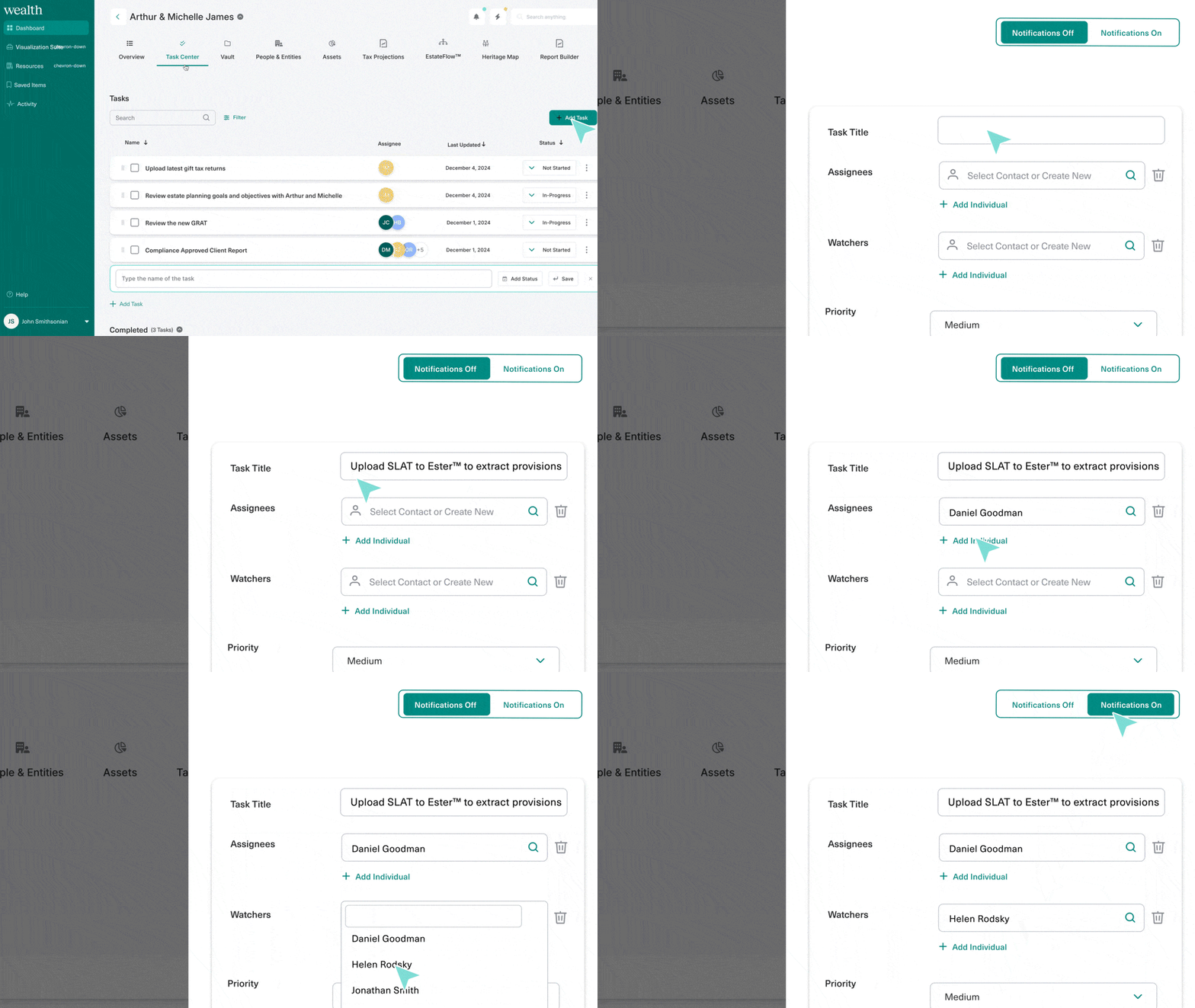
wealth.com new Task Center feature that allows advisors to create individual tasks for clients, assign owners and priority as well as get email notifications

Keep client goals on track with the latest enhancements we’ve made to your Task Center. Easily manage tasks like client onboarding, document creation and reviews by assigning responsibilities to team members and setting up notifications to stay updated on their progress. With a clear task roadmap and automatic email alerts, you’ll ensure that clients’ estate plans and deliverables stay on track.
These enhancements include the ability to:

  • Create tasks for individual clients.
  • Write a title for each individual task.
  • Assign multiple task owners.
  • Assign multiple “watchers” or people that want to be kept in the loop on progress.
  • Assign a priority level for each task.
  • Toggle email notifications on or off for each task.

Improved client onboarding experience

Improved client onboarding experience for creating estate plan documents on wealth.com

We’ve made changes to the onboarding experience for clients to help them navigate their estate planning journey with greater confidence, taking their goals and unique circumstances into consideration.

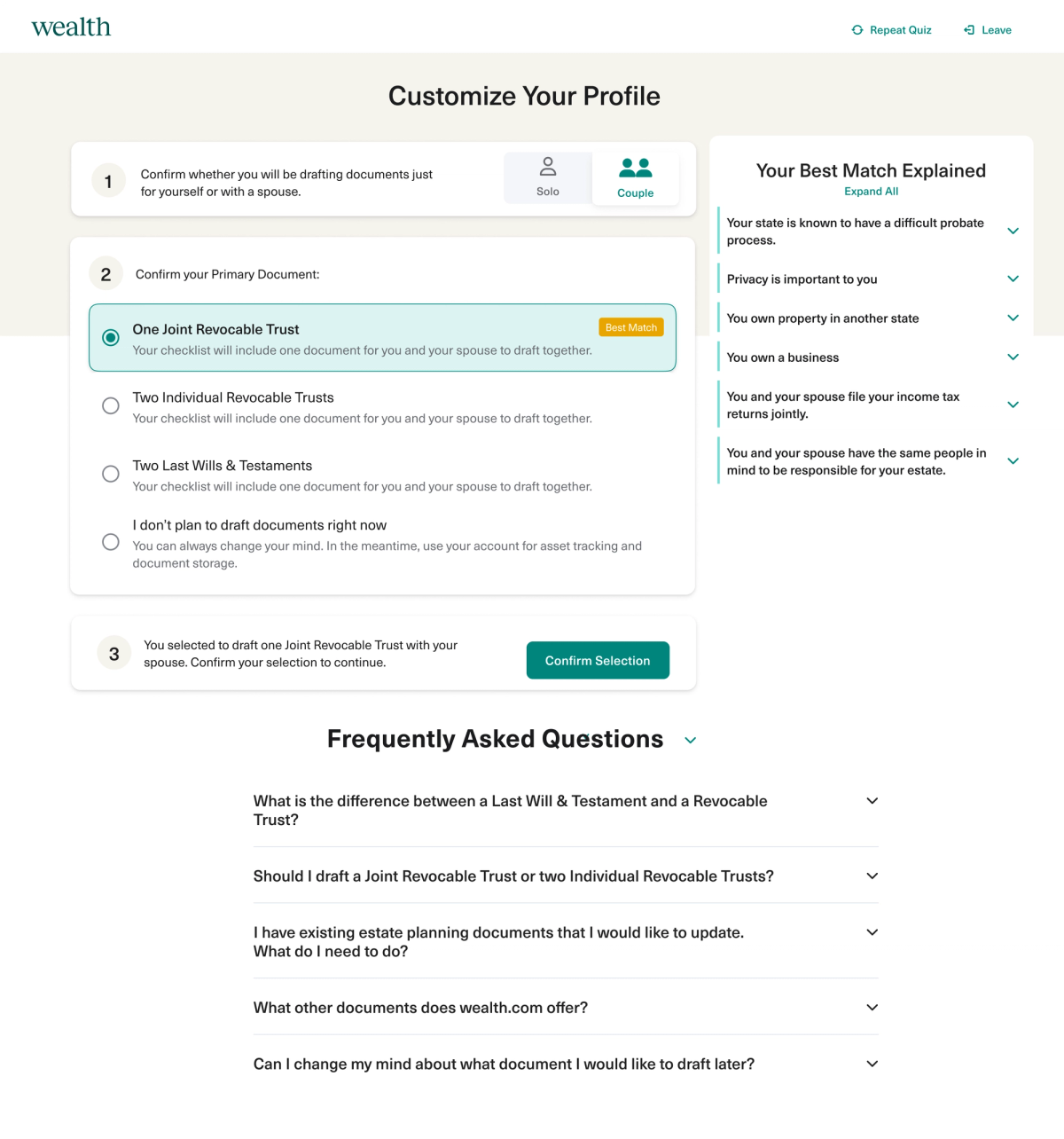
We’ve streamlined the document recommendation and selection process by making updates to our intake quiz. Clients can also now select the documents they would like to draft based best on their best match and preferences.

This enhanced experience includes:

  • Simplified questions: We’ve redesigned the question format to more efficiently identify clients estate planning needs based on their personal circumstances.
  • Confirm document recommendation: After clients complete their intake questionnaire, they have the ability to review their document recommendation alongside other options and confirm their pre-selected match or make a change.
  • Improved FAQ & educational materials: Clients can access updated educational material throughout the onboarding experience to understand how their circumstances impacted their estate planning document recommendation and to view answers to frequently asked questions about the estate planning process, including the difference between a Revocable Trust and Last Will & Testament.

Easily copy client invitation links

wealth.com feature update to copy unique client invitation links and paste in emails or client communications directly from the advisor

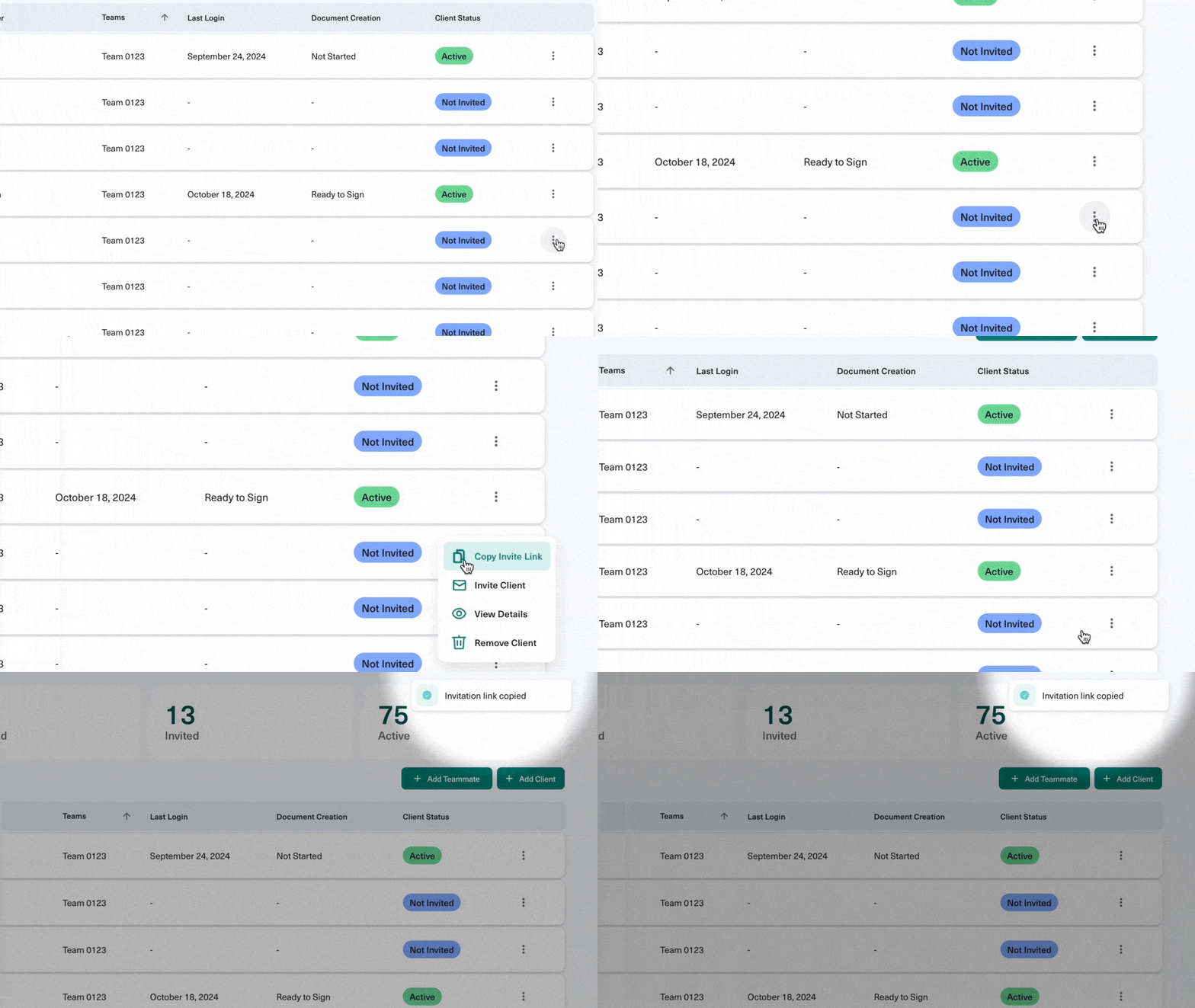
We’ve made it even easier for advisors to guide clients through their estate planning journey. Advisors can now copy unique invitation links directly from the Advisor Portal and share them wherever it’s most convenient—whether in emails, checklists or client communications.

Ready to explore these new features and more? Book a demo now to see how Wealth.com can transform your estate planning process for 2025 and beyond.

New to Ester® Estate Extraction: Executive Summaries & Expansion to Irrevocable Trusts

Wealth.com is excited to announce major enhancements coming to Ester®, our proprietary AI legal assistant tool. These updates include a brand new Executive Summary, which is optimized to recognize the decisions made in even the most complex estate planning documents and displayed in a concise, easy-to-read summary.

Executive Summaries for estate documents

Ester®, Wealth.com’s industry leading AI legal assistant, is already solving a critical bottleneck for advisors when it comes to helping clients with their estate plans. Reviewing existing estate plan documents to pull out relevant information—which can often be upwards of 60 or 70 pages—can take hours, if not days of manual work. But with Ester, advisors are able to upload their clients’ documents and, within seconds, get a summary of all the key information.

Now, advisors can also access an Executive Summary of clients’ estate planning documents that includes a link to the exact page where information was identified. This Executive Summary automatically provides built-in talking points to facilitate the conversation with clients and review key decisions.

The Executive Summary will be available for:

  • NEW: Irrevocable Trusts (including GRATs, SLATs, ILITs, Dynasty Trusts, among others)
  • NEW: Advance Health Care Directives
  • NEW: Financial Powers of Attorney
  • Revocable Trusts
  • Last Will & Testaments (including Pour-Over Wills)

Redesigned Ester Visualizer Report

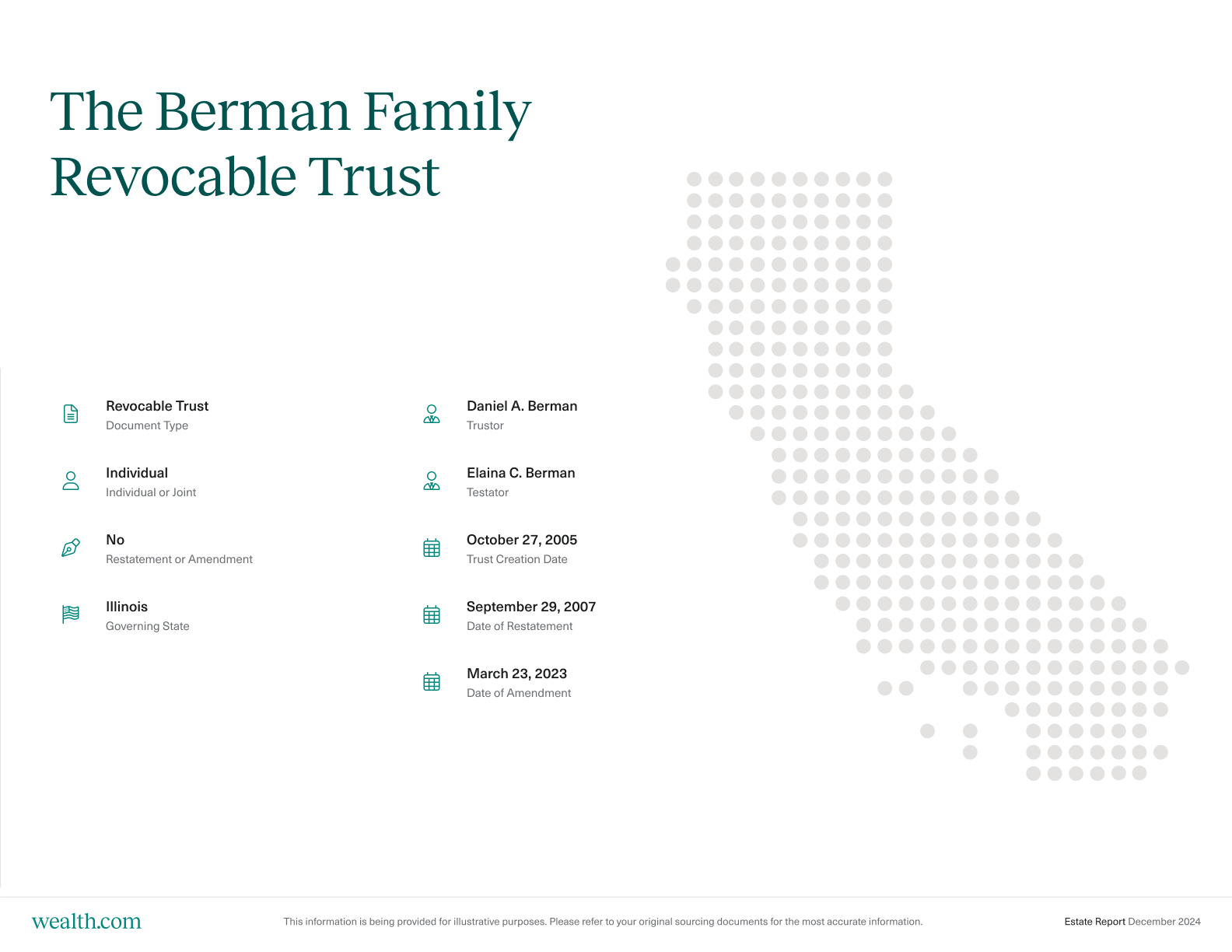
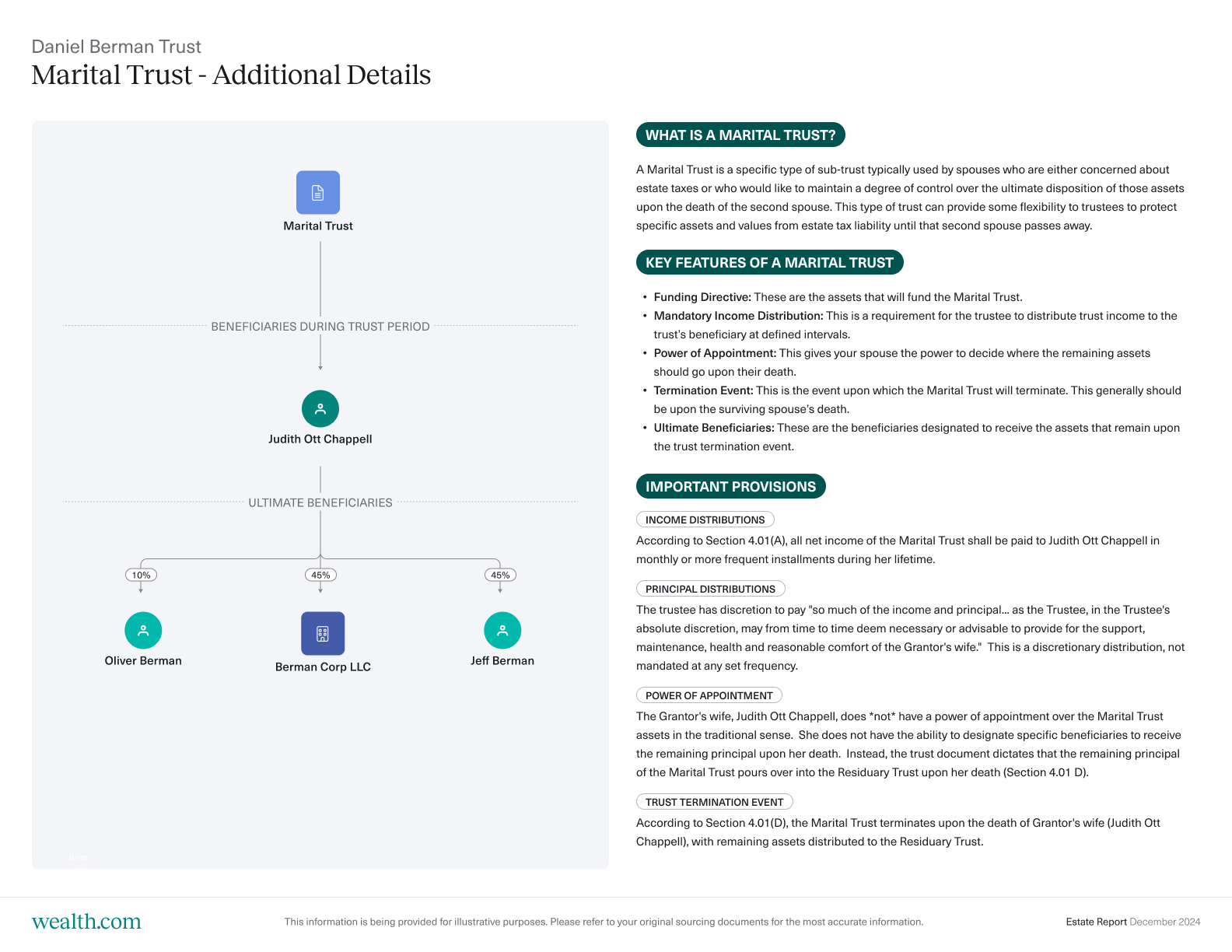
For Revocable Trusts and Last Will & Testament documents, the information that is pulled into the new Ester Executive Summary view is also fed instantaneously into a visualizer report. These distill the details of the extracted documents into visuals that clarify the complex details of the document. The new reports break down key people and entities identified in the client’s document, including grantors, trustees, executors and guardians, alongside how assets will be distributed and to whom, including recognizing income, principal and trust distributions.

Sample report pages: 


Providing clarity on the complex for advisors and clients

Ester acts as your AI legal assistant, helping you to reduce hours of manual effort to deliver clients with clarity about their estate plans and unlock additional planning opportunities to progress forward with your client.

These new updates are currently being rolled out to new and existing Wealth.com customers over the coming weeks. To learn more about how Ester and Wealth.com can reimagine estate planning for your firm, book a personalized demo today.

What’s New at Wealth.com, October 2024

At wealth.com, we pride ourselves on moving quickly and listening to our partners to build impactful solutions that allow them to be integral to their clients’ estate planning process.

We’re thrilled to share an update from the month of October of new features and functionality to provide our advisors with the most comprehensive estate planning solution.

Expand legacy planning conversations leveraging the Entity Structure Flowchart

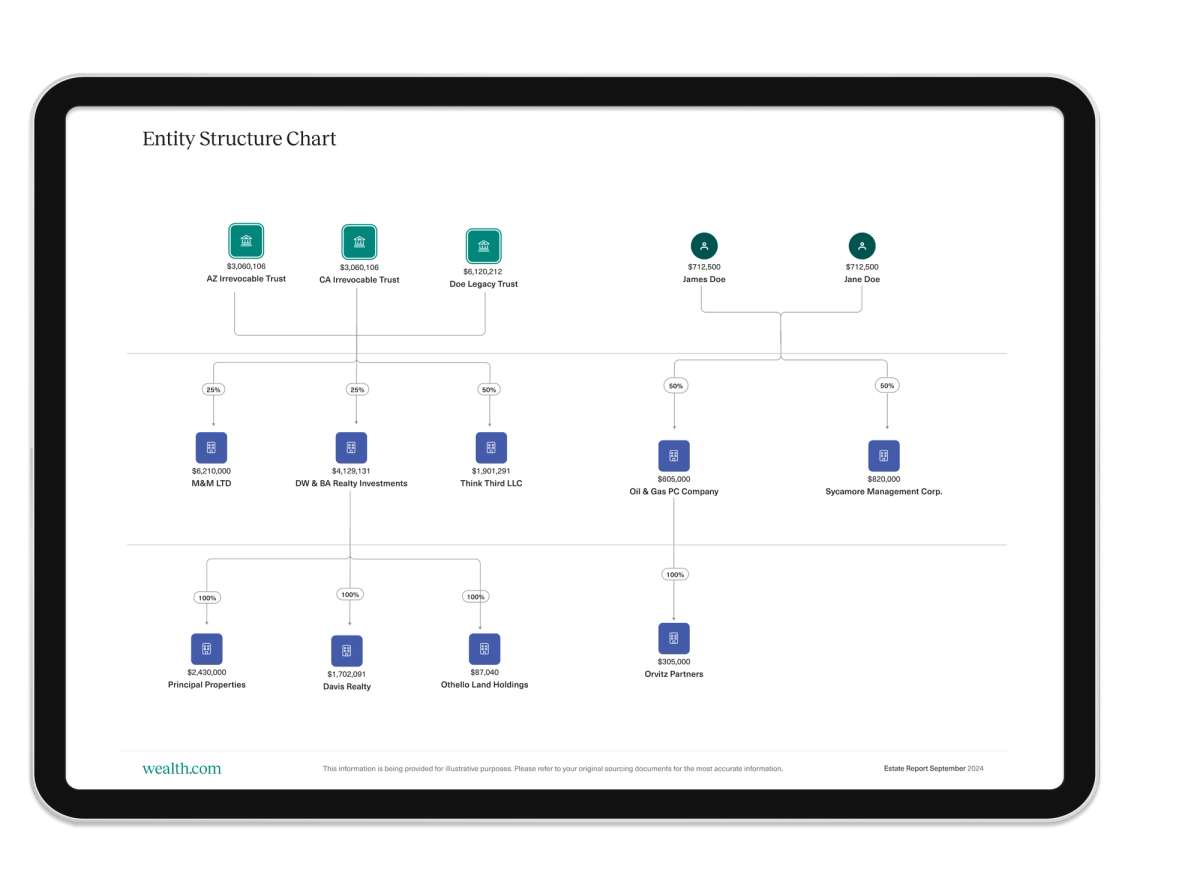
New to the Family Office Suite™: The Entity Structure Chart is automatically generated to show advisors an overview of their client’s entity holdings and the current ownership structure.

For clients who own entities, they often make up a significant part of their wealth and are an important component of legacy planning conversations. This new visualization is intended to equip advisors with the ability to identify opportunities for better succession planning and to help clients achieve tax efficiency as part of discussing their estate plan.

Easily populate client balance sheets via spreadsheet upload & mass assign ownership

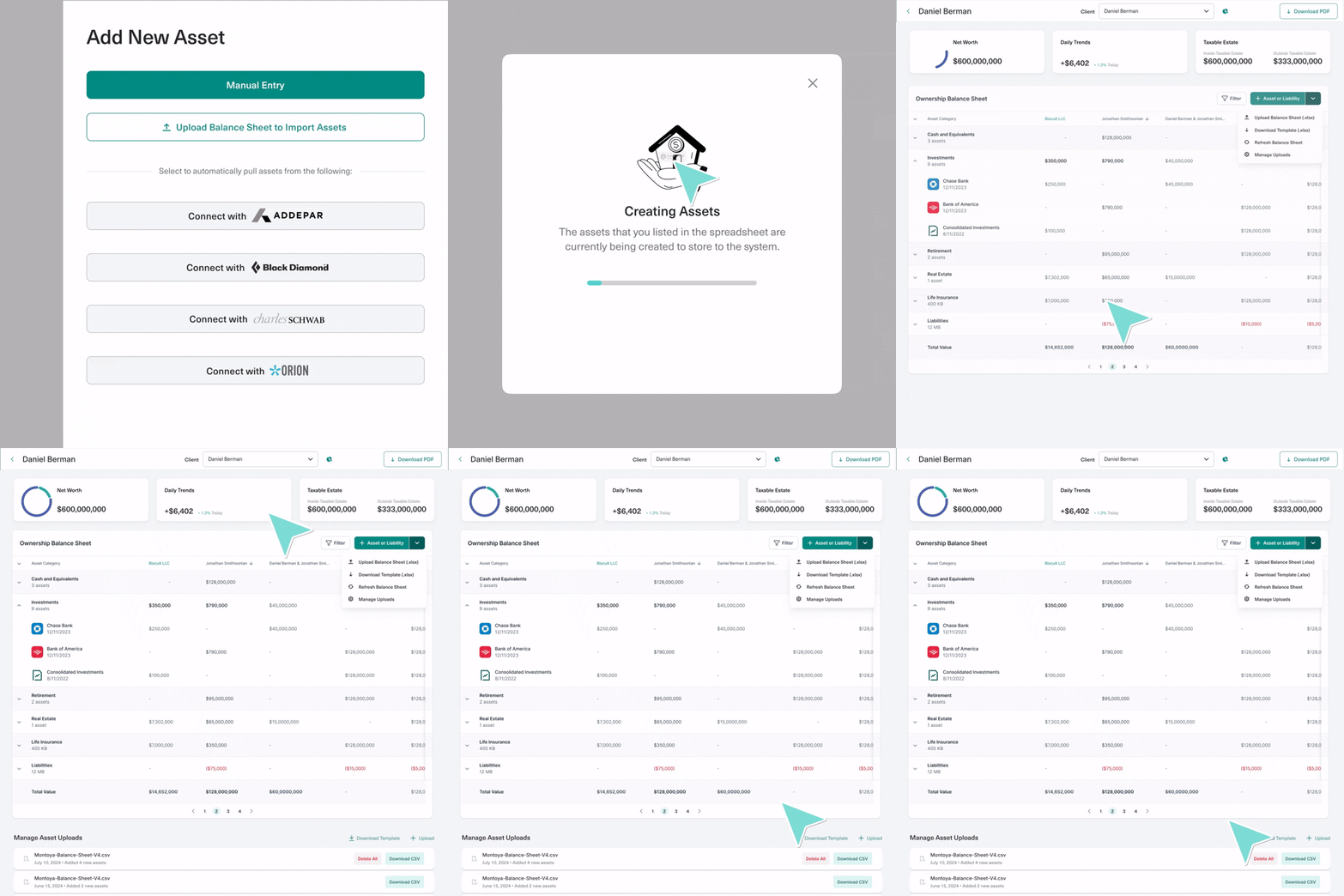
While you’re able to import asset data from our ever-expanding integration list, we’ve introduced the ability to upload a spreadsheet of assets to populate your client’s balance sheet. This provides more control for advisors to create a comprehensive view of clients’ financial picture.

In addition to importing assets to set up your client’s balance sheets, you’re able to upload additional files to continue to add information as their portfolio expands over time.

Once assets are created from the spreadsheet upload, you’re also able to bulk assign ownership information to create an even more efficient process.

New Integrations: Addepar & Orion

Our ever-expanding integration list creates a frictionless experience for our partner firms. We’re excited to announce the launch of two new integrations with Addepar and Orion. These integrations allow you to sync client asset data to wealth.com to dynamically feed into clients’ estate plans, including visual reports, estate tax analysis and asset flow projections.

Improved client onboarding experience, reorder report slides, save international addresses and more

Additional updates this month address common requests we’ve received from partners:

  • Financial Power of Attorney: Clients are now able to designate agents that live outside of the U.S. in their Financial Power of Attorney.
  • Simplified onboarding experience: When new clients go through the onboarding workflow, they are now able to confirm their recommended primary document or can elect to choose another. The recommended primary document for them to draft includes explanations for their match alongside answers to frequently asked questions.
  • Reorder slides in Report Builder: We’ve added another layer of customization to provide personalized reports for clients and collaborators! For those with the Family Office SuiteTM, you are now able to rearrange the order of slides to include before downloading the report.
  • Remove clients in the “Not Invited” status: For clients that remain “Not Invited” in your Dashboard, you can now easily remove them providing better housekeeping.

What’s New at Wealth.com – September 2024

In case you missed it, our big news this month was that we have secured a $30 million Series A funding, led by GV (Google Ventures). This funding will allow us to invest into our people and product, ensuring that we continue to deliver features that truly revolutionize estate planning while supporting the entire advisor community.

We also released some exciting new features for both our core product as well as Family Office Suite™ including enhancements to Ester™, our AI extraction tool and a redesigned Report Builder.

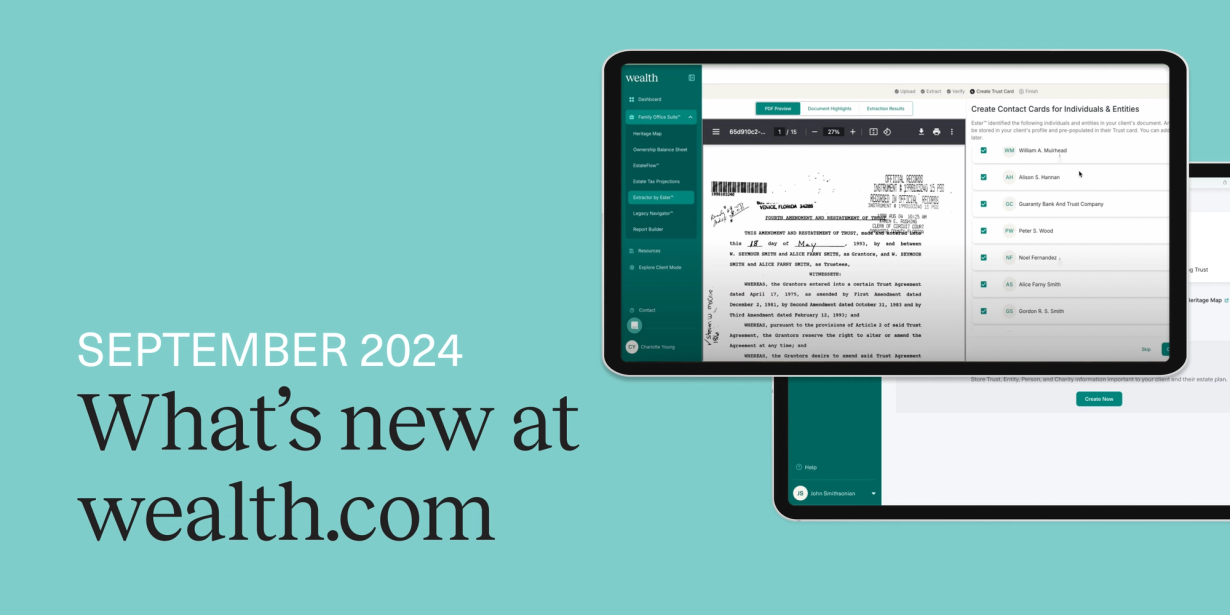
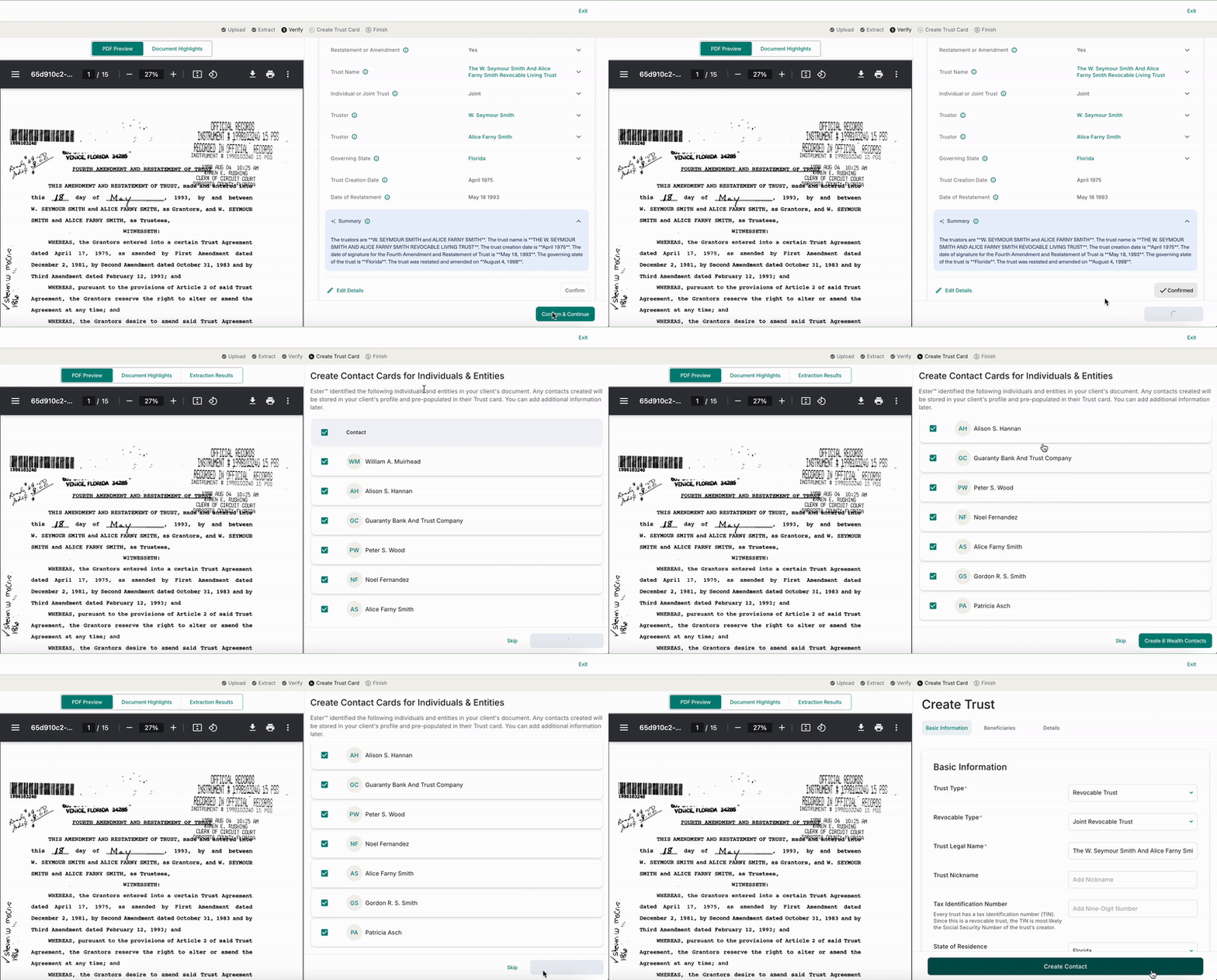
Automatic contact card creation with Extractor by Ester™

Ester™, our AI legal assistant, allows you to upload existing client estate plans to get the key details of clients existing documents in minutes, saving you hours of manual review. Now, we’re introducing even more automation to save you time by automatically creating contact cards for key individuals identified in those documents, including trustees, executors, guardians and more.

wealth.com

For clients that plan to update their estate plans using wealth.com, these contact cards are accessible during their drafting workflow.

For advisors that have Family Office Suite™, the contacts created alongside the confirmed details of the client’s document will be pre-filled into Trust and Will Cards to instantaneously feed the information into visualizations accessible for reporting.

Redesigned visualizations and new educational slides in Report Builder

Our Family Office Suite™ gives advisors access to our suite of tools intended to visualize and uncover strategic planning opportunities for their clients with complex estates. The final deliverable comes together from the Report Builder, which allows you to build a personalized report to deliver to clients that details the estate, how assets will flow and potential strategies for reducing taxes.

Our reports now have a new, sleek look that provides a simpler aesthetic for clients to understand all aspects of their estate plans—without sacrificing quality. This redesign provides you an even better way to engage with their clients and to have productive conversations about their estates.

Wealth.com Report Builder visualization redesign

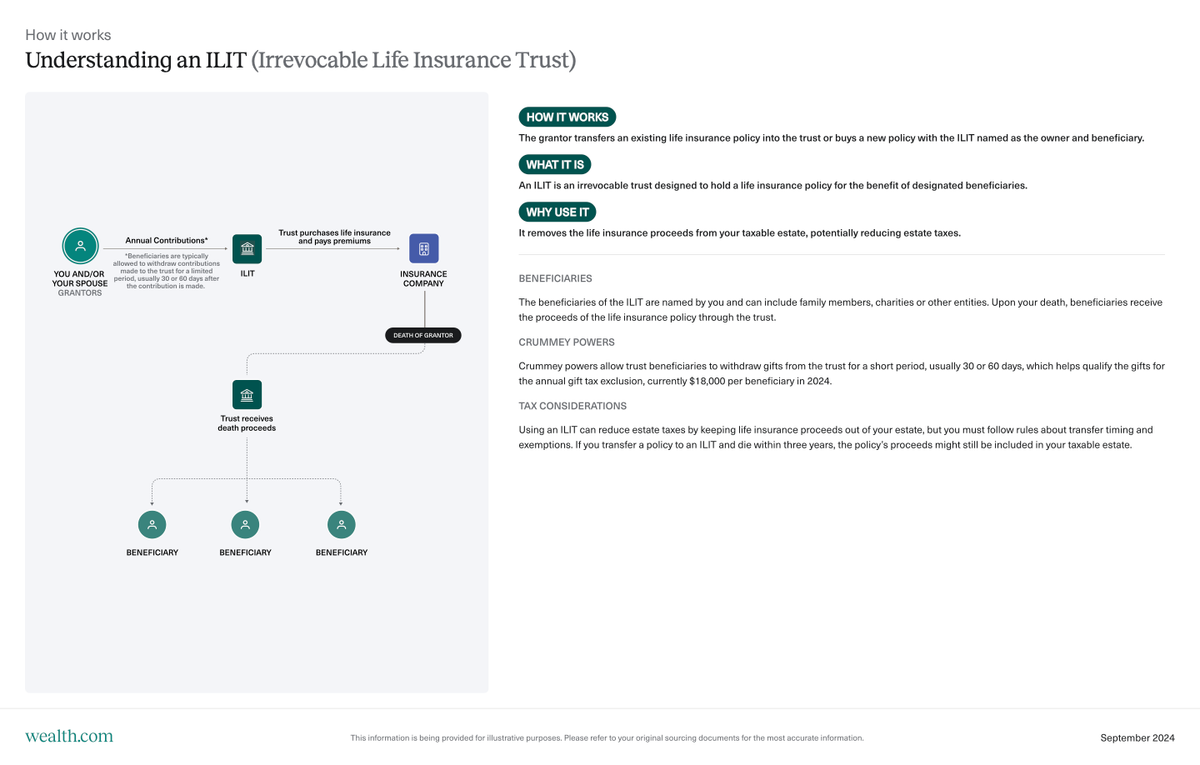
We’ve also introduced new educational slides that detail specific types of Irrevocable Trusts, including Grantor Retained Annuity Trusts (GRATs), Spousal Lifetime Access Trusts (SLATs), Qualified Personal Residence Trusts (QPRTs), Irrevocable Life Insurance Trusts (ILITs) and more.

Irrevocable Life Insurance Trust educational slide in wealth.com report builder from Family Office Suite

These slides are intended to help you to provide subject-matter expertise directly to your clients to have more meaningful discussions with them about how these types of trusts are set up, their benefits, tax considerations and potential risks.

>New Integrations with Charles Schwab

Our goal is to provide you with a seamless experience in our platform to drive scale and efficiency for your practice. That’s why we’re excited to announce that you are now able to pull asset and account information directly from Schwab.You can automatically set up your client’s balance sheets and rely on the most up-to-date details of their finances to streamline your planning process with them.

Document Enhancements: Updated Financial Power of Attorney documents

We continuously optimize our document creation offering to ensure that all of the documents available on our platform reflect any changes in federal or state legislation. We do this by partnering with local counsel in all 51 U.S. jurisdictions.

In partnership with local counsel in a number of states, including Arizona, Florida, Georgia, Ohio and Texas, we updated our Financial Power of Attorney documents.

We take pride in collaborating closely with our advisor partners and their clients to offer tools for creating, visualizing and managing estate plans effectively over time. Your feedback is invaluable to us, so please don’t hesitate to share your thoughts with us by emailing us at [email protected].

1 2 3 4